Edge Function 503 error response
Last edited: 9/29/2026
A 503 HTTP status code from an Edge Function indicates one of three possible events:
- the function failed to boot due to
SyntaxError - your own code returned a 503
- the platform itself is having issues
These require different fixes, so it is useful to decipher the cause before debugging:
Step 1: Figure out which 503 you have#
If you received back a BOOT_ERROR message, like the one below, you can jump to the resolution section: Boot Error
{ "code": "BOOT_ERROR", "message": "Function failed to start (please check logs)"}Otherwise, run the below query in the SQL Editor.
select log_attributes['request.pathname'] as function_name, log_attributes['response.status_code'] as status_code, case when log_attributes['execution_id'] != '' and log_attributes['function_id'] != '' then 'app_level' when log_attributes['execution_id'] = '' and log_attributes['function_id'] != '' then 'boot_error' when log_attributes['execution_id'] = '' and log_attributes['function_id'] = '' then 'internal_failure' end as error_typefrom logswhere source = 'function_edge_logs' and toInt32OrZero(log_attributes['response.status_code']) = 503limit 50;Depending on the output, you can use this table to find the appropriate debugging section:
| Value | Go to |
|---|---|
app_level | app level error |
boot_error | boot error - function cannot compile |
internal_failure | platform issue |
Step 2: Addressing the error#
App level error#
Somewhere in your function logic, you are returning a 503 response yourself:
Example:#
return new Response(JSON.stringify(data), { headers: { ...corsHeaders, 'Content-Type': 'application/json' }, status: 503, // <-- you set this})Check your function logic and any third-party API responses for where the 503 is originating.
- Search your function code for
503. Look for explicit status codes onResponseobjects - Trace the condition that triggered it. If your function calls external APIs, it may be passing along errors returned by those services
- Add logging before the return so future occurrences leave a trace:
console.error('Returning 503 - reason:', reason)See: Error handling in Edge Functions
Boot error#
A SyntaxError prevented your code from dynamically compiling.
In the Function Dashboard, under the affected function's Log tab, you can filter for the key phrase worker boot error:. the log will tell you syntax error occurred:
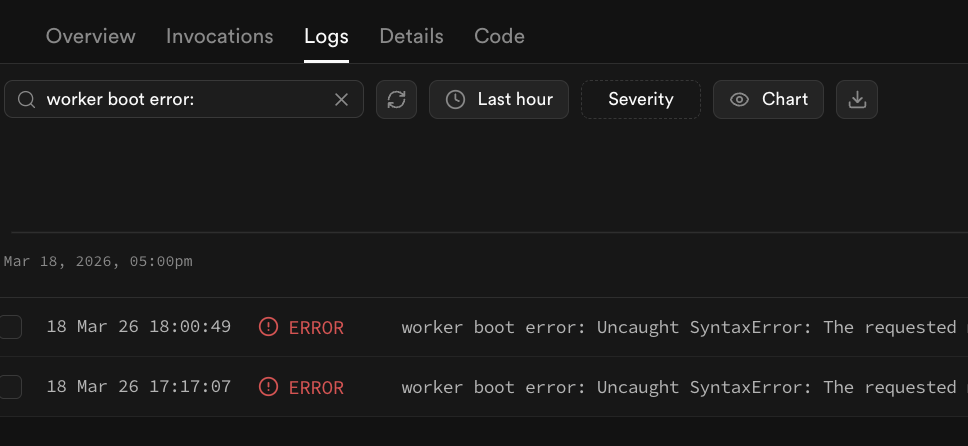
Alternatively, instead of using the Function Dashboard, you can programmatically find boot failure error messages in the SQL Editor with the below query:
select fl.event_message, fl.timestamp, fel.function_name, fel.status_codefrom ( select timestamp, event_message, log_attributes['function_id'] as function_id, log_attributes['version'] as version from logs where source = 'function_logs' and log_attributes['event_type'] = 'BootFailure' ) as fl left join ( select log_attributes['function_id'] as function_id, log_attributes['version'] as version, log_attributes['request.pathname'] as function_name, log_attributes['response.status_code'] as status_code from logs where source = 'function_edge_logs' ) as fel on fl.function_id = fel.function_id and fl.version = fel.versionorder by fl.timestamp, fel.function_namelimit 20;Example causes#
Redefining constant variables#
Redefining a constant value can prevent the code from compiling:
let some_varconst some_var // SyntaxError — already declaredThe log message for these errors should state the cause already declared and the file impacted.
worker boot error: Uncaught SyntaxError:Identifier 'some_var' has already been declared at file:///var/tmp/sb-compile-edge-runtime/source/index.ts:6:7Key word violations#
Some key words can only be used in specific contexts. For instance, the await key word can only be used inside async functions.
(req: Request) => { const { name } = await req.json(); // await only works inside async functions}The log message for these errors should state the cause Unexpected reserved word and the file impacted.
worker boot error: Uncaught SyntaxError:Unexpected reserved word at file:///var/tmp/sb-compile-edge-runtime/source/index.ts:6:28Bad imports: Non-existent modules or named exports#
Imports can cause errors if they're not available within the edge function:
// importing non-existent moduleimport supabase from 'does_not_exist'// or accessing non-existent exportimport { doesNotExist } from 'jsr:@supabase/functions-js'doesNotExist()The log message for these errors should state the cause requested module... does not provide an export and the file impacted.
worker boot error: Uncaught SyntaxError:The requested module 'jsr:@supabase/functions-js' does not provide an export named 'doesNotExist' at file:///var/tmp/sb-compile-edge-runtime/source/index.ts:2:10”To fix, check the module and its imports to make sure they exist and are supported by Supabase Edge Functions.
If the module worked before, check to see if the most recent release had breaking changes and then only import the working version.
Platform issue#
The edge function runtime is overwhelmed, or the API Gateway is returning its own 503 due to excessive load.
Open a support ticket and include the relevant log output from Step 1.
Additional resources#
- Logging Edge Function Requests
- Error Handling Edge Functions
- Local Debugging with Chrome Dev Tools
- Quickstart Deployment: Dashboard
- Quickstart Deployment: CLI
Still stuck?#
- Check the Discord, Supabase GitHub Discussions, and Reddit page for similar reports that can help with debugging
- Open a support ticket for your project if the problem persists and you believe it is a platform issue