Edge Function 401 error response
A 401 response from an Edge Function means either:
- The function failed the legacy auth verification check
- Your function’s logic deliberately returned a 401 response
Quick triage
Check the response body returned by the request
Case 1: "Invalid Token" or "Missing authorization header"
{ "code": 401, "message": "Invalid Token or Protected Header formatting" }{ "code": 401, "message": "Missing authorization header" }Both of these messages come from the legacy auth verification check
Go to: Built-in JWT check failures
Case 2: Custom message or empty body
If the response body contains a message you coded, or nothing at all, then your function code did execute and returned a 401 itself.
Go to: Your function returned a 401
Case 3: Not sure
Run this query in the SQL Editor to classify recent 401s:
select
  timestamp,
  log_attributes['request.pathname'] as function_name,
  case
    when log_attributes['execution_id'] != '' then 'your_code_returned_401'
    when log_attributes['execution_id'] = ''
    and (
      log_attributes['request.sb.apikey.apikey.prefix'] != ''
      or (
        log_attributes['request.sb.jwt.authorization.payload.algorithm'] != ''
        and log_attributes['request.sb.jwt.authorization.payload.algorithm'] != 'HS256'
      )
    ) then 'incompatible_keys'
    when log_attributes['execution_id'] = ''
    and (
      log_attributes['request.sb.jwt.authorization.invalid'] != ''
      or log_attributes['request.sb.apikey.apikey.error'] != ''
      or log_attributes['request.sb.jwt.authorization.payload.algorithm'] = 'HS256'
    ) then 'invalid_key'
    when log_attributes['execution_id'] = ''
    and log_attributes['request.sb.jwt.authorization.payload.algorithm'] = ''
    and log_attributes['request.sb.apikey.apikey.prefix'] = '' then 'missing_auth_header'
  end as cause
from logs
where
  source = 'function_edge_logs'
  and toInt32OrZero(log_attributes['response.status_code']) = 401
order by timestamp desc
limit 50;
Depending on the output, you can use this table to find the appropriate debugging section:
| Value | Go to |
|---|---|
your_code_returned_401 |
Your function returned a 401 |
incompatible_keys |
Incompatible key format |
invalid_key |
Invalid key |
missing_auth_header |
Missing Authorization header |
Your function returned a 401
Your function ran, and somewhere in your code, its logic returned a 401.
Example:
return new Response(JSON.stringify(data), {
  headers: { ...corsHeaders, 'Content-Type': 'application/json' },
  status: 401, // <-- you set this
})
How to fix:
- Search your function code for
401. Look for explicit status codes onResponseobjects. - Trace the condition that triggered it. If you’re interacting with a third-party API in your code, that service may be returning 401 that you’re forwarding in the response object.
- Add logging before the return so future occurrences leave a trace:
console.error('Returning 401 - reason:', reason)See: Error handling in Edge Functions
Built-in JWT check failures
Supabase Edge Functions have a legacy auth verification check that runs before your code. When it fails, your function never executes, and you get a 401 with "Invalid JWT" or "Missing authorization header" directly from the platform.
[!WARNING] Supabase now recommends turning off this built-in check and managing authentication directly in your function code, giving you more control over access. See Securing Edge Functions.
The subsections below cover specific failure modes.
Incompatible key format
Your project uses the new asymmetric keys for authentication. However, the legacy auth verification check only understands the legacy format.
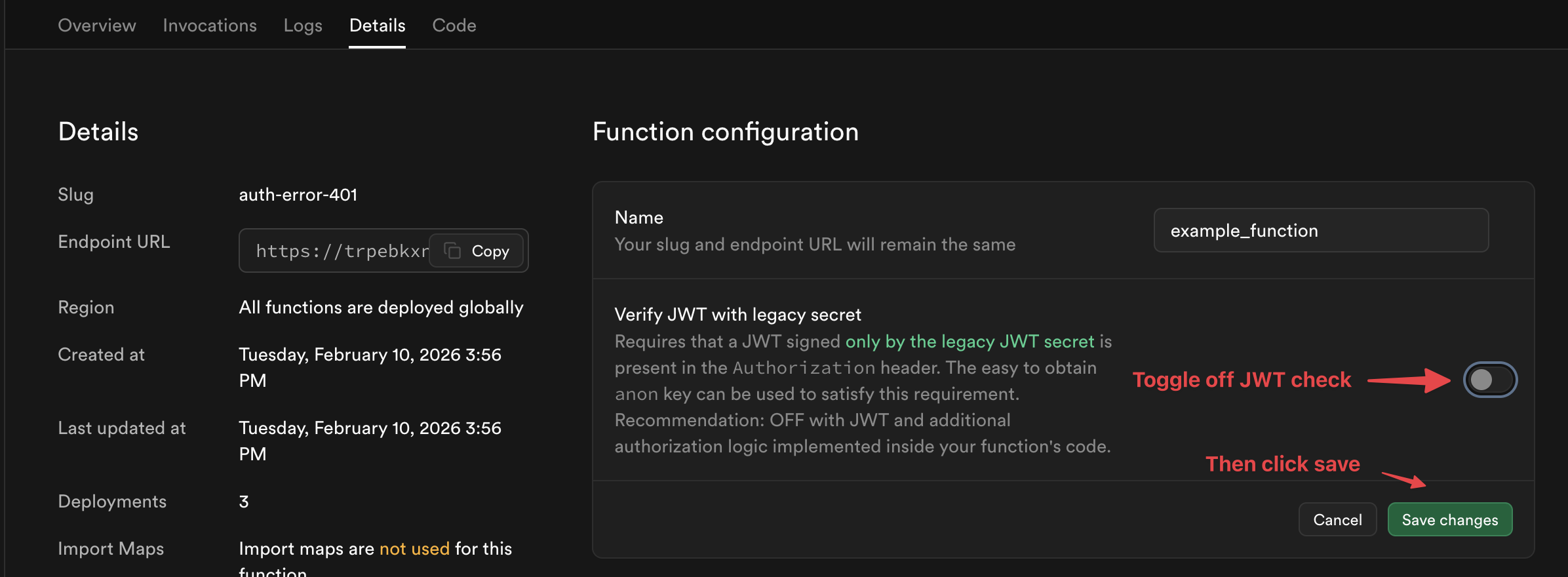
Fix: Disable the built-in JWT check using one of the below methods and optionally handle auth in your function code
Method A: Dashboard
In the Functions Dashboard, open the affected function’s detail tab and toggle off JWT verification.
Method B: Supabase CLI
Redeploy the edge function from the Supabase CLI with the --no-verify-jwt flag
supabase functions deploy YOUR_FUNCTION_NAME --no-verify-jwtMethod C: Management API
Disable the legacy auth check with the Supabase Management API:
- Generate a token at Account Preferences.
- Get your project ID from General Settings.
- Run:
curl 'https://api.supabase.com/v1/projects/PROJECT_ID/functions/FUNCTION_NAME' \
  --request PATCH \
  --header 'Content-Type: application/json' \
  --header 'Authorization: Bearer YOUR_SECRET_TOKEN' \
  --data '{"verify_jwt": false}'
Invalid key
The built-in check is enabled and the key you sent doesn’t match your project’s keys.
Fix (recommended): Disable the built-in check using the steps in Incompatible key format.
Fix (alternative): If you want to keep the built-in check, ensure you’re sending a valid key. Use one of your legacy API keys with the Supabase client library when making your request.
const supabase = createClient('https://xyzcompany.supabase.co', 'anon-key-or-service_role-key')Missing authorization header
The built-in check is enabled but your request has no Authorization header at all.
If you’re using a Supabase client library, the header is added automatically. If you’re calling the function from an external client (cURL, fetch, etc.), you need to supply it:
curl -L -X POST 'https://PROJECT_REF.supabase.co/functions/v1/hello-world' \
  -H 'Authorization: Bearer YOUR_ANON_OR_SERVICE_ROLE_KEY' \
  --data '{"name":"Functions"}'
Alternatively, you can disable the built-in check entirely (see Incompatible key format).
Additional resources
- Securing Edge Functions with Auth
- Logging Edge Function Requests
- Error Handling Edge Functions
- Quickstart: Dashboard deployment
- Quickstart: CLI deployment
Still stuck?
- Check the Discord, Supabase GitHub Discussions, and Reddit page for similar reports that can help with debugging
- Open a support ticket for your project if the problem persists and you believe it is a platform issue