How To Restore a Project Paused for More Than 1 Year
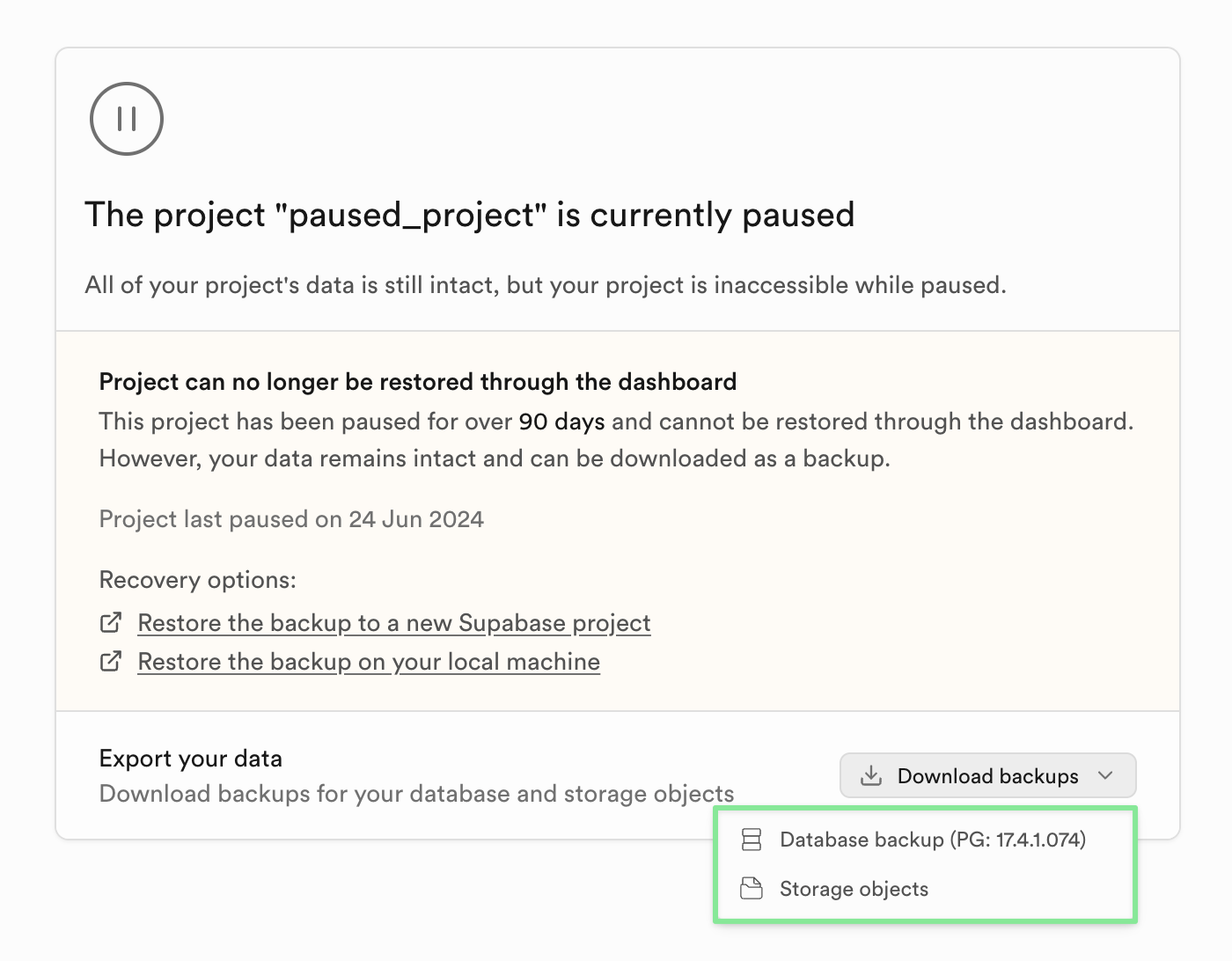
Projects paused for more than 1 year can no longer be restored through Supabase Studio. You can still recover your data by downloading the available backups and migrating them to a new project.
Both the database backup and Storage objects can be downloaded from the Project Overview section in Supabase Studio before the project is deleted.
Check this short video walk-through of the full migration process.
Step 1: Download your backups
In the Project Overview of your paused project, download:
- Database backup — the
.backupfile from the Backups section - Storage objects — all files from your Storage buckets
Once a project is deleted, all associated data including backups is permanently removed and cannot be recovered.
Step 2: Create a new Supabase project
Create a new project at database.new and configure it to match your previous setup (extensions, webhooks, Realtime publications, etc.).
Step 3: Restore the database
Get the Session pooler connection string for your new project from the Connect dialog. Replace the [YOUR-PASSWORD] placeholder in the connection string with your database password. If you don’t remember it, reset it in Database Settings.
Unzip the downloaded backup file if it has a .gz extension, then run:
psql -d [CONNECTION_STRING] -f /path/to/backup_file.backupSome errors like object already exists are expected and can be safely ignored — they occur because the new project already has the default Supabase schemas applied.
See the Restore Dashboard backup guide for detailed instructions and troubleshooting.
Step 4: Restore Storage objects
Use the Supabase CLI to copy your downloaded storage files to the new project’s buckets:
supabase loginsupabase link --project-ref [NEW_PROJECT_REF]supabase storage cp /path/to/downloaded/files ss:///bucket_name -r --experimentalRepeat for each bucket. See the supabase storage cp reference for all available flags.
Step 5: Copy project configurations
Use the Management API to copy configurations (Auth, Realtime, Storage, etc.) from the paused project to the new one. You need Owner or Admin permissions on both projects.
Get your access token from the Account Tokens page, then save the script below to a file and make it executable:
chmod +x sync_supabase_config.shConfig sync script
#!/usr/bin/env bashset -euo pipefail# ---------------------------------------------------------------------------# Sync Supabase project configuration from a SOURCE project to a TARGET project# using the Supabase Management API.## Usage:# export SUPABASE_ACCESS_TOKEN="sbp_..."# ./sync_supabase_config.sh <source_ref> <target_ref> [--dry-run]## Options:# --dry-run Fetch and diff configs without applying changes to the target.## Output:# Saves source and target configs to ./config_sync_<timestamp>/ so you can# review exactly what was (or would be) changed.# ---------------------------------------------------------------------------API_BASE="https://api.supabase.com/v1"SOURCE_REF="${1:?Usage: $0 <source_ref> <target_ref> [--dry-run]}"TARGET_REF="${2:?Usage: $0 <source_ref> <target_ref> [--dry-run]}"DRY_RUN="${3:-}"TOKEN="${SUPABASE_ACCESS_TOKEN:?Set SUPABASE_ACCESS_TOKEN environment variable}"AUTH_HEADER="Authorization: Bearer ${TOKEN}"CONTENT_TYPE="Content-Type: application/json"if ! command -v jq &>/dev/null; then echo "Error: jq is required but not installed." >&2 exit 1fi# Configs to sync: "label|get_path|update_method|update_path"# pgbouncer is read-only so it is excluded.CONFIGS=( "Auth|/config/auth|PATCH|/config/auth" "Realtime|/config/realtime|PATCH|/config/realtime" "Database Pooler|/config/database/pooler|PATCH|/config/database/pooler" "Database Postgres|/config/database/postgres|PUT|/config/database/postgres" "PostgREST|/postgrest|PATCH|/postgrest" "Storage|/config/storage|PATCH|/config/storage")# ---------------------------------------------------------------------------# Per-config payload transforms applied before PATCH/PUT.# Each function reads JSON from stdin and writes cleaned JSON to stdout.# ---------------------------------------------------------------------------transform_Auth() { jq 'with_entries( .key as $k | select( (["rate_limit_email_sent", "rate_limit_sms_sent", "security_captcha_secret", "nimbus_oauth_client_secret", "db_max_pool_size", "db_max_pool_size_unit", "api_max_request_duration", "sessions_single_per_user", "sessions_tags" ] | index($k)) == null and ($k | test("^(smtp_|sms_messagebird_|sms_textlocal_|sms_twilio_|sms_vonage_|sms_test_otp|hook_mfa_verification_attempt_|hook_password_verification_attempt_)") | not) and ($k | test("passkey|web_?authn") | not) and ($k | test("_secrets?$") | not) ) )'}transform_Database_Pooler() { jq 'if type == "array" then .[0] else . end | {default_pool_size, pool_mode} | with_entries(select(.value != null))'}transform_PostgREST() { jq 'with_entries(select(.value != null))'}transform_Storage() { jq 'del(.capabilities, .migrationVersion, .databasePoolMode, .features)'}transform_payload() { local label="$1" local func_name="transform_${label// /_}" if declare -f "$func_name" &>/dev/null; then "$func_name" else cat fi}TMPDIR=$(mktemp -d)trap 'rm -rf "$TMPDIR"' EXITOUTDIR="./config_sync_$(date +%Y%m%d_%H%M%S)"mkdir -p "$OUTDIR"echo "============================================="echo " Supabase Config Sync"echo " Source : ${SOURCE_REF}"echo " Target : ${TARGET_REF}"echo " Output : ${OUTDIR}"[[ "$DRY_RUN" == "--dry-run" ]] && echo " Mode : DRY RUN (no changes applied)"echo "============================================="echofor entry in "${CONFIGS[@]}"; do IFS='|' read -r label get_path method update_path <<< "$entry" safe_label="${label// /_}" echo "--- ${label} ---" # Fetch source config source_file="${OUTDIR}/${safe_label}_source.json" http_code=$(curl -s -o "$source_file" -w "%{http_code}" \ "${API_BASE}/projects/${SOURCE_REF}${get_path}" \ -H "$AUTH_HEADER") if [[ "$http_code" != "200" ]]; then echo " [SKIP] GET source failed (HTTP ${http_code})" echo continue fi # Fetch target config target_file="${OUTDIR}/${safe_label}_target.json" http_code_target=$(curl -s -o "$target_file" -w "%{http_code}" \ "${API_BASE}/projects/${TARGET_REF}${get_path}" \ -H "$AUTH_HEADER") if [[ "$http_code_target" != "200" ]]; then echo " [SKIP] GET target failed (HTTP ${http_code_target})" echo continue fi echo " [OK] Fetched both configs" # Build transformed payload payload_file="${TMPDIR}/${safe_label}_payload.json" transform_payload "$label" < "$source_file" > "$payload_file" # Skip if the transformed payload is empty (source had no usable config) if [[ "$(jq 'length' "$payload_file")" == "0" ]]; then echo " [SKIP] Source config is empty — nothing to apply" echo continue fi # Pretty-print both sides and diff source_pretty="${TMPDIR}/${safe_label}_src_pretty.json" target_pretty="${TMPDIR}/${safe_label}_tgt_pretty.json" jq --sort-keys . "$payload_file" > "$source_pretty" jq --sort-keys . "$target_file" > "$target_pretty" if diff -q "$source_pretty" "$target_pretty" &>/dev/null; then echo " [=] No differences" else echo " [~] Differences (source → target):" diff --unified=3 "$target_pretty" "$source_pretty" | sed 's/^/ /' || true fi if [[ "$DRY_RUN" == "--dry-run" ]]; then echo continue fi # Apply to target update_response="${TMPDIR}/${safe_label}_response.json" update_code=$(curl -s -o "$update_response" -w "%{http_code}" \ -X "$method" \ "${API_BASE}/projects/${TARGET_REF}${update_path}" \ -H "$AUTH_HEADER" \ -H "$CONTENT_TYPE" \ -d @"$payload_file") if [[ "$update_code" =~ ^2 ]]; then echo " [OK] Applied to target (HTTP ${update_code})" else echo " [FAIL] ${method} failed (HTTP ${update_code})" cat "$update_response" echo fi echodoneecho "Done. Configs saved to ${OUTDIR}/"The script saves both source and target configs to a local config_sync_<timestamp>/ directory so you can review exactly what changed. Use --dry-run to preview differences without applying them.
Related guides
- Migrating within Supabase
- Restore Dashboard backup
- Backup and Restore using the CLI
- Pausing and restoring free projects
- Pausing Pro projects
- Download logical backups
- Transferring from cloud to self-host in Supabase