Backup and Restore using the CLI
Learn how to backup and restore projects using the Supabase CLI
Migrating the database#
Back up database using the CLI#
On your project dashboard, click Connect.
Use the Session pooler connection string by default. If your network supports IPv6 or you have the IPv4 add-on enabled, use the direct connection string.
Session pooler connection string:
postgresql://postgres.[PROJECT-REF]:[YOUR-PASSWORD]@aws-0-us-east-1.pooler.supabase.com:5432/postgresDirect connection string:
postgresql://postgres.[PROJECT-REF]:[YOUR-PASSWORD]@db.[PROJECT-REF].supabase.com:5432/postgresReset the password in the Database Settings.
Replace [YOUR-PASSWORD] in the connection string with the database password.
Run these commands after replacing [CONNECTION_STRING] with your connection string from the previous steps:
supabase db dump --db-url [CONNECTION_STRING] -f roles.sql --role-onlysupabase db dump --db-url [CONNECTION_STRING] -f schema.sqlsupabase db dump --db-url [CONNECTION_STRING] -f data.sql --use-copy --data-only -x "storage.buckets_vectors" -x "storage.vector_indexes"Before you begin#
Restore backup using CLI#
These steps cover a manual logical restore (pg_dump / psql) into a project you create yourself. The Restore to a new project and Branching flows copy your encryption root key to the new project automatically, so the key-copy step below does not apply to them.
In the new project:
- If Webhooks were used in the old database, enable Database Webhooks.
- If any non-default extensions were used in the old database, enable the Extensions.
Go to the Connect panel for the connection string.
Use the Session pooler connection string by default. If your ISP supports IPv6, use the direct connection string.
Session pooler connection string:
postgresql://postgres.[PROJECT-REF]:[YOUR-PASSWORD]@aws-0-us-east-1.pooler.supabase.com:5432/postgresDirect connection string:
postgresql://postgres.[PROJECT-REF]:[YOUR-PASSWORD]@db.[PROJECT-REF].supabase.com:5432/postgresReplace [YOUR-PASSWORD] in the connection string with the database password. If you do not remember your password, you can reset it on the Database > Settings page of the Dashboard.
Run these commands after replacing [CONNECTION_STRING] with your connection string from the previous steps:
psql \ --single-transaction \ --variable ON_ERROR_STOP=1 \ --file roles.sql \ --file schema.sql \ --command 'SET session_replication_role = replica' \ --file data.sql \ --dbname [CONNECTION_STRING]If replication for Supabase Realtime was used in the old database, enable publication on the Database > Publications section of the Dashboard on the tables necessary.
Special considerations#
Preserving migration history#
If you were using Supabase CLI for managing migrations on your old database and would like to preserve the migration history in your newly restored project, you need to insert the migration records separately using the following commands.
supabase db dump --db-url "$OLD_DB_URL" -f history_schema.sql --schema supabase_migrationssupabase db dump --db-url "$OLD_DB_URL" -f history_data.sql --use-copy --data-only --schema supabase_migrationspsql \ --single-transaction \ --variable ON_ERROR_STOP=1 \ --file history_schema.sql \ --file history_data.sql \ --dbname "$NEW_DB_URL"Schema changes to auth and storage#
If you have modified the auth and storage schemas in your old project, such as adding triggers or Row Level Security (RLS) policies, you have to restore them separately. The Supabase CLI can help you diff the old project against your local migrations. The command depends on your project's diff engine.
Which diff engine your project uses depends on config.toml. If it contains an [experimental.pgdelta] section with enabled = true, your project uses pg-delta. If the section is missing or enabled is false, your project uses the legacy migra engine. See Diff engines for how the two differ and how to switch.
On pg-delta, a plain diff includes your customizations in the managed schemas:
supabase link --project-ref "$OLD_PROJECT_REF"supabase db diff --linked > changes.sqlUnder the pg-delta engine, the diff excludes platform objects in Supabase-managed schemas such as auth and storage. It captures your customizations on top of them, such as triggers on managed tables, RLS policies on any table in auth, and RLS policies on storage.objects, storage.buckets, and realtime.messages. A trigger counts as yours only when its function lives outside the managed schemas (for example, a trigger on auth.users calling a function in public). A trigger whose function lives inside auth or storage is excluded, even if you created the function. The diff also skips other objects you create inside these schemas, such as your own functions or indexes.
On the legacy migra engine, name the schemas explicitly:
supabase link --project-ref "$OLD_PROJECT_REF"supabase db diff --linked --schema auth,storage > changes.sqlRecreate those objects on the new project from your own migration files or through the Dashboard.
Troubleshooting notes#
Disabling triggers during restore:#
Setting session_replication_role to replica disables triggers during the migration, preventing columns from being double encrypted.
Custom roles require passwords#
If you created any custom roles with the LOGIN attribute, you must manually set their passwords in the new project. This can be done with the SQL command:
alter user "YOUR_USER" with password 'SOME_NEW_PASSWORD';supabase_admin permission errors#
If you encounter permission errors related to supabase_admin during restore:
- Open
schema.sql - Comment out any lines containing:
ALTER ... OWNER TO "supabase_admin"cli_login_postgres role grant error#
If you encounter the error:
ERROR: permission denied to grant role "postgres"DETAIL: Only roles with the ADMIN option on role "postgres" may grant this role.- Open
roles.sql - Comment out the line:
GRANT "postgres" TO "cli_login_postgres" WITH INHERIT FALSE GRANTED BY "supabase_admin";cli_login_postgres role issues after cloning#
The cli_login_role must be created by the supabase_admin role. If the migration process cloned over the role before the CLI could generate its own version, it may encounter the error:
"message":"Failed to create login role:ERROR: 0LP01: role "postgres" is a member of role "cli_login_postgres"To resolve the issue, drop the custom cli_login_postgres role. Then the CLI can recreate it with the right privileges:
DROP ROLE IF EXISTS cli_login_postgres;Migrating edge functions#
Steps (using the Supabase CLI):#
supabase functions list --project-ref your_project_refYou can download an individual function with the following command:
supabase functions download YOUR_FUNCTION_NAME --project-ref your_project_refThe command will not download import maps nor deno.json files. If your edge functions rely on them for dependency management, you will have to add them back manually.
supabase functions deploy --project-ref your_target_project_refThis deploys all functions within the supabase/functions to the target project. You can confirm by checking your Edge Functions on the project dashboard
Steps (using the Supabase Dashboard):#
Dependencies defined through import maps and deno.json files will need to be rewritten to rely on their direct import paths when using this approach.
In the source project, navigate to Edge Functions from the side menu
Using the Download button, download your desired function as zip: 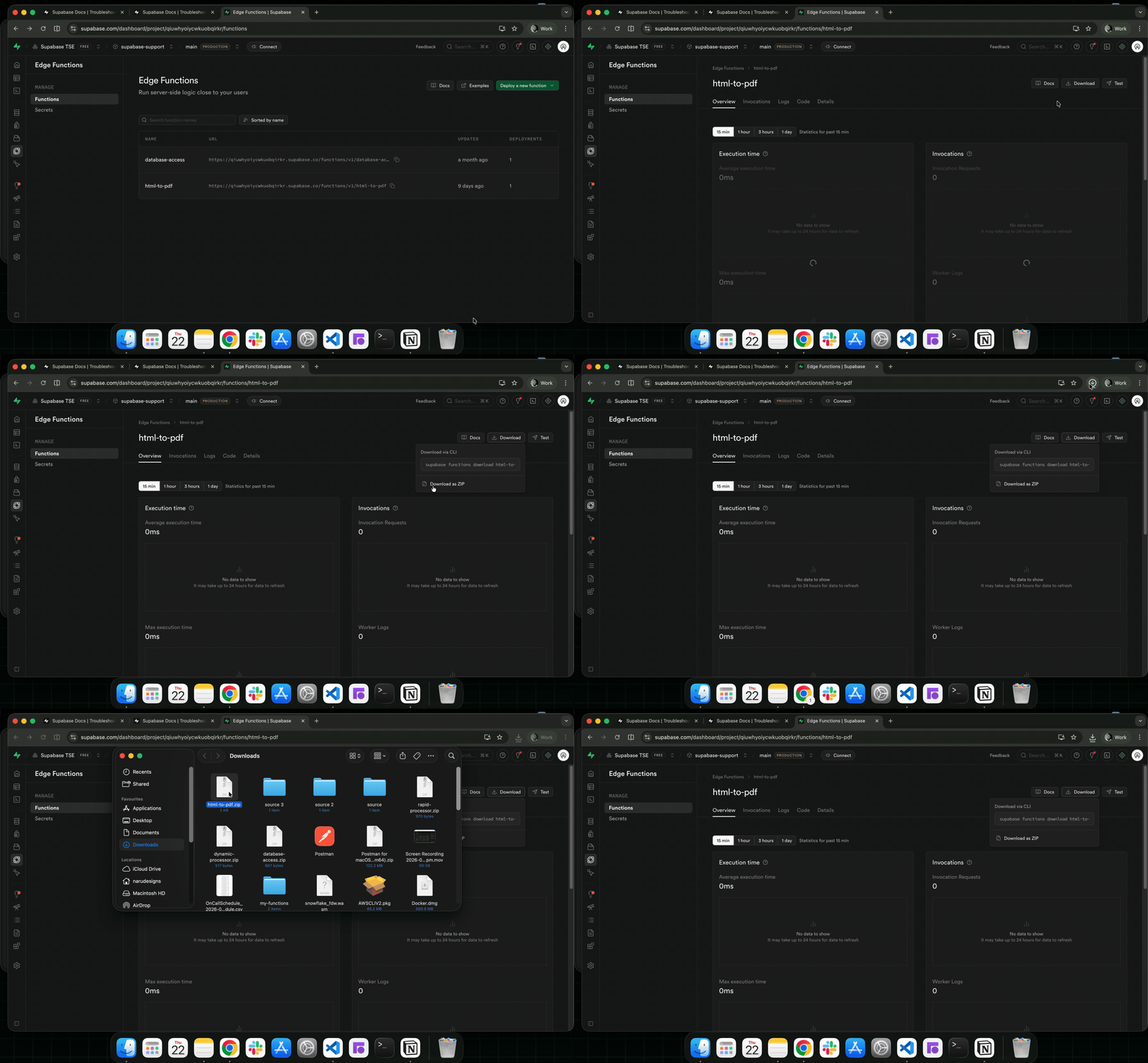
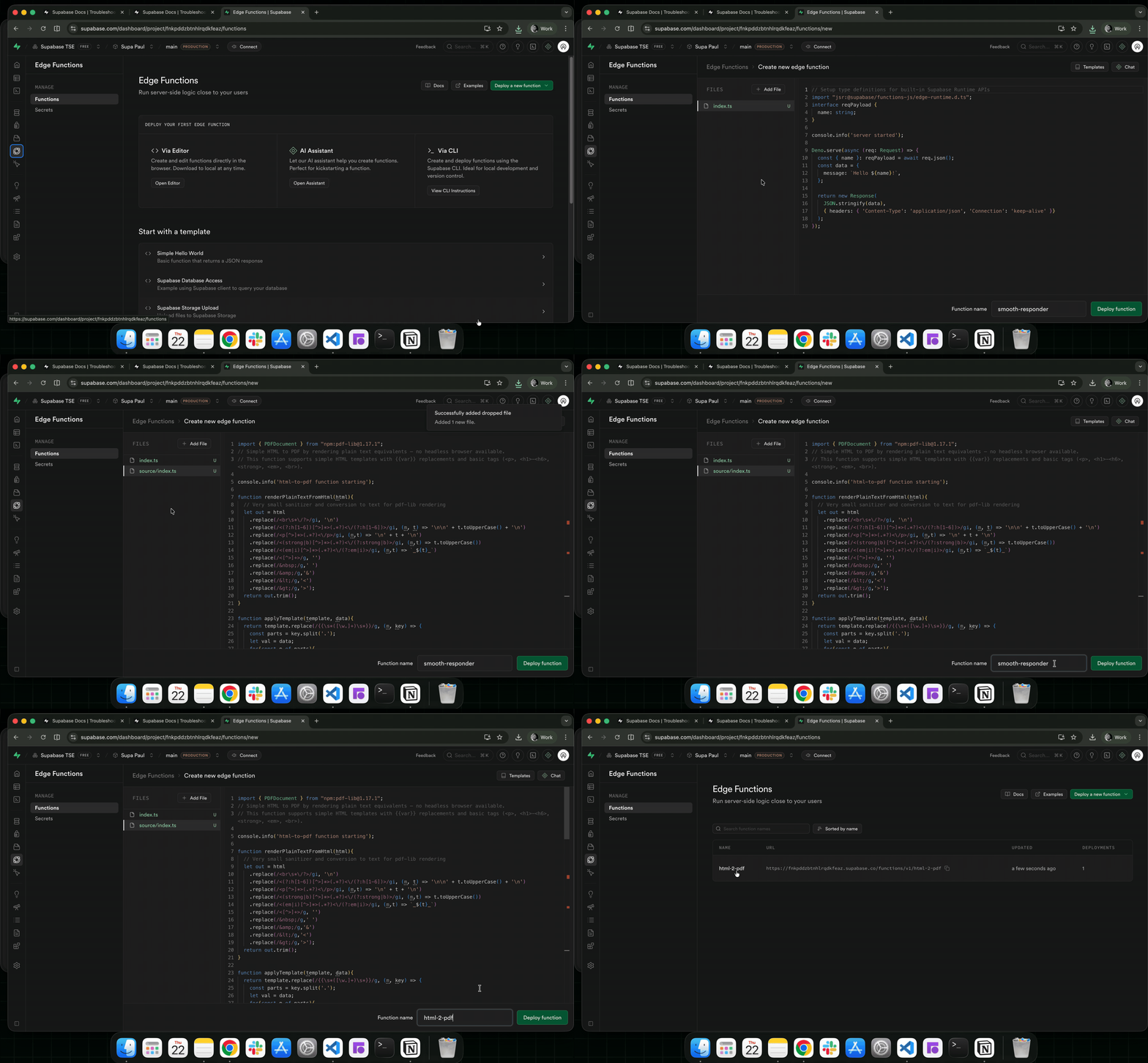
In the target project, navigate to Edge Functions from the side menu
Click on the Deploy a new function button, select Via Editor operation
Drag and drop your downloaded function (the zip function from step 2) into the editor
Add your function name and click on the Deploy function button to deploy the function:
Migrating storage objects#
Using your preferred JavaScript package manager, create a new project with the supabase client package
npm init -ynpm install @supabase/supabase-jsAdd the example script to it.
// npm install @supabase/supabase-js@2const { createClient } = require('@supabase/supabase-js')const OLD_PROJECT_URL = 'https://xxx.supabase.co'const OLD_PROJECT_SERVICE_KEY = 'old-project-service-key-xxx'const NEW_PROJECT_URL = 'https://yyy.supabase.co'const NEW_PROJECT_SERVICE_KEY = 'new-project-service-key-yyy'const oldSupabase = createClient(OLD_PROJECT_URL, OLD_PROJECT_SERVICE_KEY)const newSupabase = createClient(NEW_PROJECT_URL, NEW_PROJECT_SERVICE_KEY)function createLoadingAnimation(message) { const readline = require('readline') const frames = ['⠋', '⠙', '⠹', '⠸', '⠼', '⠴', '⠦', '⠧', '⠇', '⠏'] let i = 0 let timer let stopped = false const animate = () => { if (stopped) return process.stdout.write(`\r${frames[i]} ${message}`) i = (i + 1) % frames.length timer = setTimeout(animate, 80) } animate() return { stop: (finalMessage = '') => { stopped = true clearTimeout(timer) readline.clearLine(process.stdout, 0) readline.cursorTo(process.stdout, 0) process.stdout.write(`✓ ${finalMessage || message}\n`) }, }}/*** Lists all files in a bucket, handling nested folders recursively.*/async function listAllFiles(bucket, path = '') { const loader = createLoadingAnimation(`Listing files in '${bucket}${path ? '/' + path : ''}'...`) try { const { data, error } = await oldSupabase.storage.from(bucket).list(path, { limit: 1000 }) if (error) { loader.stop(`Error listing files in '${bucket}${path ? '/' + path : ''}'`) throw new Error(`❌ Error listing files in bucket '${bucket}': ${error.message}`) } if (!data || data.length === 0) { loader.stop(`No files found in '${bucket}${path ? '/' + path : ''}'`) return [] } let files = [] for (const item of data) { if (!item.metadata) { loader.stop(`Found folder '${item.name}' in '${bucket}${path ? '/' + path : ''}'`) const subFiles = await listAllFiles(bucket, `${path}${item.name}/`) files = files.concat(subFiles) } else { files.push({ fullPath: `${path}${item.name}`, metadata: item.metadata }) } } loader.stop(`Found ${files.length} files in '${bucket}${path ? '/' + path : ''}'`) return files } catch (error) { loader.stop() throw error }}/*** Creates a bucket in the new Supabase project if it doesn't exist.*/async function ensureBucketExists(bucketName, options = {}) { const { data: existingBucket, error: getBucketError } = await newSupabase.storage.getBucket(bucketName) if (getBucketError && !getBucketError.message.includes('not found')) { throw new Error(`❌ Error checking if bucket '${bucketName}' exists: ${getBucketError.message}`) } if (!existingBucket) { console.log(`🪣 Creating bucket '${bucketName}' in new project...`) const { error } = await newSupabase.storage.createBucket(bucketName, options) if (error) throw new Error(`❌ Failed to create bucket '${bucketName}': ${error.message}`) console.log(`✅ Created bucket '${bucketName}'`) } else { console.log(`ℹ️ Bucket '${bucketName}' already exists in new project`) }}/*** Migrates a single file from the old project to the new one.*/async function migrateFile(sourceBucketName, targetBucketName, file) { const loader = createLoadingAnimation( `Migrating ${file.fullPath} in bucket '${sourceBucketName}' to '${targetBucketName}'...` ) try { const { data, error: downloadError } = await oldSupabase.storage .from(sourceBucketName) .download(file.fullPath) if (downloadError) { loader.stop(`Failed to migrate ${file.fullPath}: Download error`) throw new Error(`Download failed: ${downloadError.message}`) } // Preserve all available metadata from the original file const uploadOptions = { upsert: true, contentType: file.metadata?.mimetype, cacheControl: file.metadata?.cacheControl, } const { error: uploadError } = await newSupabase.storage .from(targetBucketName) .upload(file.fullPath, data, uploadOptions) if (uploadError) { loader.stop(`Failed to migrate ${file.fullPath}: Upload error`) throw new Error(`Upload failed: ${uploadError.message}`) } loader.stop( `Migrated ${file.fullPath} in bucket '${sourceBucketName}' to '${targetBucketName}'` ) return { success: true, path: file.fullPath } } catch (err) { console.error( `❌ Error migrating ${file.fullPath} in bucket '${targetBucketName}':`, err.message ) return { success: false, path: file.fullPath, error: err.message } }}function chunkArray(array, size) { const chunks = [] for (let i = 0; i < array.length; i += size) { chunks.push(array.slice(i, i + size)) } return chunks}/*** Migrates all buckets and files from the old Supabase project to the new one.* Processes files in parallel within batches for efficiency.*/async function migrateBuckets() { console.log('🔄 Starting Supabase Storage migration...') console.log(`📦 Source project: ${OLD_PROJECT_URL}`) console.log(`📦 Target project: ${NEW_PROJECT_URL}`) const readline = require('readline').createInterface({ input: process.stdin, output: process.stdout, }) console.log( '\n⚠️ WARNING: This migration may overwrite files in the target project if they have the same paths.' ) console.log('⚠️ It is recommended to back up your target project before proceeding.') const answer = await new Promise((resolve) => { readline.question('Do you want to proceed with the migration? (yes/no): ', resolve) }) readline.close() if (answer.toLowerCase() !== 'yes') { console.log('Migration canceled by user.') return { canceled: true } } console.log('\n📦 Fetching all buckets from old project...') const { data: oldBuckets, error: bucketListError } = await oldSupabase.storage.listBuckets() if (bucketListError) throw new Error(`❌ Error fetching buckets: ${bucketListError.message}`) console.log(`✅ Found ${oldBuckets.length} buckets to migrate.`) const { data: existingBuckets, error: existingBucketsError } = await newSupabase.storage.listBuckets() if (existingBucketsError) throw new Error(`❌ Error fetching existing buckets: ${existingBucketsError.message}`) const existingBucketNames = existingBuckets.map((b) => b.name) const conflictingBuckets = oldBuckets.filter((b) => existingBucketNames.includes(b.name)) let conflictStrategy = 2 if (conflictingBuckets.length > 0) { console.log('\n⚠️ The following buckets already exist in the target project:') conflictingBuckets.forEach((b) => console.log(` - ${b.name}`)) const conflictAnswer = await new Promise((resolve) => { const rl = require('readline').createInterface({ input: process.stdin, output: process.stdout, }) rl.question( '\nHow do you want to handle existing buckets?\n' + '1. Skip existing buckets\n' + '2. Merge files (may overwrite existing files)\n' + '3. Rename buckets in target (add suffix "_migrated")\n' + '4. Cancel migration\n' + 'Enter your choice (1-4): ', (answer) => { rl.close() resolve(answer) } ) }) if (conflictAnswer === '4') { console.log('Migration canceled by user.') return { canceled: true } } conflictStrategy = parseInt(conflictAnswer) if (isNaN(conflictStrategy) || conflictStrategy < 1 || conflictStrategy > 3) { console.log('Invalid choice. Migration canceled.') return { canceled: true } } } const migrationStats = { totalBuckets: oldBuckets.length, processedBuckets: 0, skippedBuckets: 0, totalFiles: 0, successfulFiles: 0, failedFiles: 0, failedFilesList: [], } for (const bucket of oldBuckets) { const bucketName = bucket.name console.log(`\n📁 Processing bucket: ${bucketName}`) let targetBucketName = bucketName if (existingBucketNames.includes(bucketName)) { if (conflictStrategy === 1) { console.log(`⏩ Skipping bucket '${bucketName}' as it already exists in target project`) migrationStats.skippedBuckets++ continue } else if (conflictStrategy === 3) { targetBucketName = `${bucketName}_migrated` console.log(`🔄 Renaming bucket to '${targetBucketName}' in target project`) } else { console.log(`🔄 Merging files into existing bucket '${bucketName}' in target project`) } } // Preserve bucket configuration when creating in the new project if (targetBucketName !== bucketName || !existingBucketNames.includes(bucketName)) { await ensureBucketExists(targetBucketName, { public: bucket.public, fileSizeLimit: bucket.file_size_limit, allowedMimeTypes: bucket.allowed_mime_types, }) } const files = await listAllFiles(bucketName) console.log(`✅ Found ${files.length} files in bucket '${bucketName}'.`) migrationStats.totalFiles += files.length const batches = chunkArray(files, 10) for (let i = 0; i < batches.length; i++) { console.log(`\n🚀 Processing batch ${i + 1}/${batches.length} (${batches[i].length} files)`) const results = await Promise.all( batches[i].map((file) => migrateFile(bucketName, targetBucketName, file)) ) const batchSuccesses = results.filter((r) => r.success).length const batchFailures = results.filter((r) => !r.success) migrationStats.successfulFiles += batchSuccesses migrationStats.failedFiles += batchFailures.length migrationStats.failedFilesList.push(...batchFailures.map((f) => f.path)) console.log( `✅ Completed batch ${i + 1}/${batches.length}: ${batchSuccesses} succeeded, ${batchFailures.length} failed` ) } migrationStats.processedBuckets++ console.log(`✅ Completed bucket '${bucketName}' migration`) } console.log('\n📊 Migration Summary:') console.log( `Buckets: ${migrationStats.processedBuckets}/${migrationStats.totalBuckets} processed, ${migrationStats.skippedBuckets} skipped` ) console.log( `Files: ${migrationStats.successfulFiles} succeeded, ${migrationStats.failedFiles} failed (${migrationStats.totalFiles} total)` ) if (migrationStats.failedFiles > 0) { console.log('\n⚠️ Failed files:') migrationStats.failedFilesList.forEach((path) => console.log(` - ${path}`)) return migrationStats } return migrationStats}migrateBuckets() .then((stats) => { if (stats.failedFiles > 0) { console.log(`\n⚠️ Migration completed with ${stats.failedFiles} failed files.`) process.exit(1) } else { console.log('\n🎉 Migration completed successfully!') process.exit(0) } }) .catch((err) => { console.error('❌ Fatal error during migration:', err.message) process.exit(1) })Get the secret keys or service_role keys for both your new and old projects, then substitute them into the script. From the Data API settings, copy your project URL and add it to the script as well.
//rest of code...// add relevant details for old projectconst OLD_PROJECT_URL = 'https://xxx.supabase.co'const OLD_PROJECT_SERVICE_KEY = 'old-project-service-key-xxx'// add relevant details for new projectconst NEW_PROJECT_URL = 'https://yyy.supabase.co'const NEW_PROJECT_SERVICE_KEY = 'new-project-service-key-yyy'...//rest of codenode index.js