
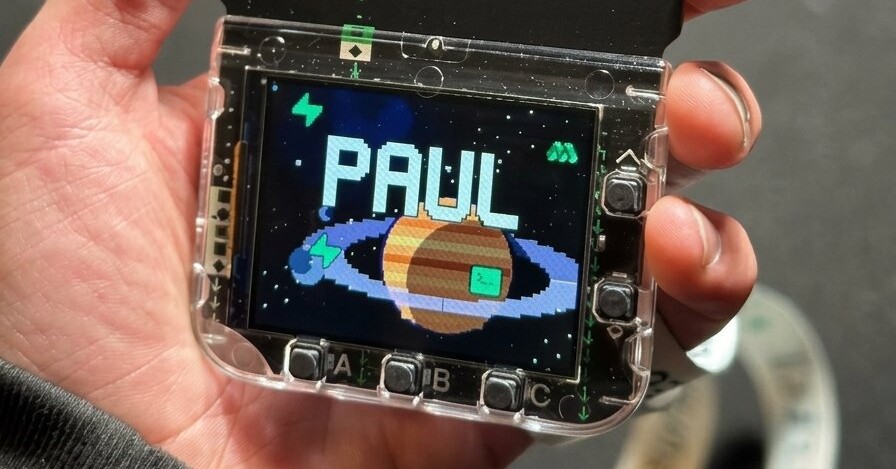
Supabase Select is our developer conference, and this year it took place in San Francisco on October 2. Every attendee received a programmable badge they can keep hacking on long after the conference.
During the conference it was an animated name tag with the schedule and a couple of games on it. Since then, people have turned it into a live flight tracker, an arcade game about dead tuples, and a language model that runs entirely on the badge.
Here’s how we went about building the badges, and some ideas to push it even further.
What's inside#
The badge is based on the Pimoroni Tufty 2350 and ships with:
- An RP2350 microcontroller
- A color screen
- A rechargeable battery
- Onboard Wi-Fi and Bluetooth
- Five physical buttons you can map to anything
Making a thousand of them#
Our first iteration was a board with a Raspberry Pi Pico, a screen, and a battery, attached so you could pull them apart and use them as a starter kit once the conference was over. It was a great solution for building a modular conference badge, but assembling a thousand of them by hand was not feasible.
With our next iteration, we went with Pimoroni, who build similar hardware - screen, battery and programmable microcontroller - but on a single board, greatly reducing the complexity of assembly.
We wrote all the software that shipped on it: the name tag, the schedule, and the games. It was only a fraction of what the badge was capable of, but it was exactly what we needed at Select.
Getting 800 badges ready#
The badges arrived two weeks before Select: 800 of them, in 20 boxes of 40, and none would turn on. A firmware bug had kept them awake the whole way over and drained every battery.
We bought as many USB chargers as Amazon could get to us in time. Each badge draws less than half an amp, so the cheap 30-port hubs schools use to charge iPads overnight were plenty. A full charge takes about three hours, so 60 ports at a time works out to 14 batches, and with an hour per batch for plugging and unplugging, about 56 hours of charging. On top of that, every badge had to be plugged into a computer, one at a time, for the firmware update that fixed the battery drain, then go back into deep sleep while it finished charging.
Then the Wi-Fi. The plan was a 2.4 GHz network just for the badges, covering the whole venue, so they could stay online all day. When we tested on site, we couldn't get a single badge to connect.
Luckily, the badge was designed to work offline from day one, so nobody at Select noticed. But a few hidden features needed the network and never got their time to shine:
- The Taylor Swift effect: every badge in the room flashing and animating in sync, on demand during a talk.
- Room-wide announcements: every badge around you showing "Woz is about to speak" at the same moment.
- A public leaderboard: live high scores from the badge games.
The one thing that did need the network was the schedule. The badge software was finished before the conference schedule was, so every badge had to get online once to download the latest version. Plan B: a Wi-Fi hotspot, with two badges at a time sitting on top of it. Each one woke up, got the time, opened a TLS connection to Supabase and pulled the schedule. About a minute a badge, close to seven hours in all.
The last few days were an assembly line, in shifts, with anyone who had spare hands: charge, update, sync, sleep, box, lanyard. Two days before the doors opened, we were still working through the last boxes. On the day, we spotted attendees huddled around a laptop, already hacking their badges.
What people have built so far#
Check out these cool projects built by people at Select and others watching from home:
-
Joey (@jsmillerdev) built a live flight tracker with a radar view, individual flight tracking, and details like altitude and speed.
-
Mike Demo (@Mike_demo) made a badge app that helps attendees find places to eat, with filters for vegan, vegetarian, gluten-free, kosher, and halal options. He wasn't at Select and joined in remotely.
-
A game about collecting music notes
Tiffany Collins (@tiff_ishh) turned hers into a game where the Tenor logo collects notes while dodging an angry composer.
-
Amy Mayernik (@LFGAmy) watched the keynote from home and turned the OrioleDB section into an arcade game, where you vacuum dead rows before the table fills up and then unlock an OrioleDB mode that gives you a break from cleanup.
-
A language model running locally
Maddie D. Reese (@maddiedreese) fit a tiny story-generation model onto the badge with an on-screen keyboard to prompt it, running entirely on the device.
-
Robert Soriano (@wobsoriano) got home and had his badge running Muse before the week was out.
There are many more in the badge showcase, and every one of them started from the same hardware and ended up somewhere we wouldn't have thought to go.
Hack your badge#
If you can build a web or mobile app, you already know most of what it takes to put a screen on your desk, or a sensor in your room that does something useful when a reading changes. The hardware is inexpensive, and was not affected by the recent price increase of memory - Raspberry Pi raised the price of their computers several times, while microcontrollers remained the same price. With a tool like Claude Code, a first hardware project becomes an afternoon spent mostly on deciding what to make.
Everything you need is at badge.select:
- If you have a physical badge, the first app guide walks you through adding your own app over USB.
- If you want a coding agent to help, the badge project kit gives Claude Code the API reference and instructions it needs. You can try something like: "Read the project instructions and badge API reference. Build a pomodoro timer with a large countdown. Use A to start or pause, B to reset, and C to switch between work and break sessions."
- If you weren't at Select, the virtual badge and the Make editor let you build in your browser.
- If you want to go further, replace the firmware and work in C or Rust. There's already a guide for turning the badge into an Apple IIe emulator, with a physical USB keyboard and BASIC programs running on the badge itself.
Good first projects are small and useful: a clock with exactly the display you want, a pomodoro timer beside your keyboard, a display that reads from your Supabase project over Wi-Fi, or a light that turns on when your coding agent needs you. With Supabase Realtime, the badge can react the moment something changes in your app. Your first change can be as small as making one button do something different.
Show us what you make#
Share your project on X with #SelectBadge so we can see it. We’re running a contest for the best badges through the end of October. 1st place gets $1,000 in Supabase credits plus passes to Supabase Select 2027 for you and three colleagues. 2nd place gets $500 in Supabase credits and 3rd place gets $250.
At Select, it was your name tag. What'll you make with it next?