Changelog

New updates and product improvements

TypeScript users, here's a cool new feature! Starting from v2.48.0, defining custom types for JSON fields in supabase-js and using them with the JSON selector is now easier, making your code more type-safe and intuitive.

Quick Example

Define your custom JSON type:


_34
type CustomJsonType = {
_34
foo: string;
_34
bar: { baz: number };
_34
en: 'ONE' | 'TWO' | 'THREE';
_34
};
_34
_34
export type Database = MergeDeep<
_34
DatabaseGenerated,
_34
{
_34
your_schema: {
_34
Tables: {
_34
your_table: {
_34
Row: {
_34
data: CustomJsonType | null;
_34
};
_34
// Optional: Use if you want type-checking for inserts and update
_34
// Insert: {
_34
// data?: CustomJsonType | null;
_34
// };
_34
// Update: {
_34
// data?: CustomJsonType | null;
_34
// };
_34
}
_34
}
_34
Views: {
_34
your_view: {
_34
Row: {
_34
data: CustomJsonType | null;
_34
};
_34
}
_34
}
_34
}
_34
}
_34
>

What You Get

Now, when you query your data:


_15
const res = await client
_15
.from('your_table')
_15
.select('data->bar->baz, data->en, data->bar');
_15
_15
if (res.data) {
_15
console.log(res.data);
_15
// TypeScript infers the shape of your JSON data:
_15
// [
_15
// {
_15
// baz: number;
_15
// en: 'ONE' | 'TWO' | 'THREE';
_15
// bar: { baz: number };
_15
// }
_15
// ]
_15
}

Get Started

Start using this feature with our guides:

Supabase CLI 2.7.0 adds support for bundling Edge Functions with static files.

You can access bundled files via Deno's file-system APIs. Here's an example function that serves a PDF file.


_14
import fs from 'node:fs'; // This should be the first import to prevent other modules to trying to use their own polyfills.
_14
_14
_14
Deno.serve(async () => {
_14
return new Response(
_14
await Deno.readFile("./my-book.pdf"),
_14
{
_14
headers: {
_14
"Content-Type": "application/pdf",
_14
"Content-Disposition": 'attachment; filename="my-book.pdf"',
_14
},
_14
},
_14
);
_14
});

Use cases

  • Use custom Wasm modules in your Edge Functions (check this guide for more details on how to write & use wasm modules in Edge Functions)
  • Create paywalls for serving digital content like ebooks
  • HTML email templates for sending emails using Edge Functions

How to configure

You will need to add static files to the function's directory to bundle them. Then, in the supabase/config.toml file for the project, add these lines:


_10
[functions.buy-book]
_10
static_files = [ "./functions/buy-book/my-book.pdf" ]

You can specify an array of files or use a glob pattern (eg: "./functions/email-templates/*.html")

Check the CLI configuration reference for more details: https://supabase.com/docs/guides/local-development/cli/config#functions.function_name.static_files

Note: This feature is currently not available with branching and will be added with the next stable release of the CLI.

If you're only using Transaction Mode on Connection Pooler port 6543 or already using Session Mode on port 5432 then no action is required.

On February 28, 2025, Supavisor (Supabase's Connection Pooler) is deprecating Session Mode on port 6543. After this date, port 6543 will only support Transaction Mode while port 5432 continues to support Session Mode.

We’re making this change because Session Mode is already available on port 5432 and this streamlines our connection pooler’s ports and their respective modes.

Required steps:

  1. Update your application/database clients to use port 5432 for Session Mode.
  2. In your project’s Database Settings (”Connection pooling configuration”), set “Pool Mode” to “Transaction” and click “Save” (please keep in mind that this will restart all your connections connected to the Pooler).

Please reach out to our support if you have any questions or concerns regarding this change.

UI Overhaul for Log Explorer log details

https://github.com/user-attachments/assets/1f752ebc-a814-4f1c-845f-4659a0dc87d3

The changes here addresses some UX friction whereby depending on the query, the detail panel of the log would be hard to read. We've hence updated the log detail drawing to add better spacing, the option to expand rows, and also use our TimestampInfo tooltip in the UI as well!

PR: https://github.com/supabase/supabase/pull/31684

Link: https://supabase.com/dashboard/project/_/logs/explorer

Toggle for enabling connection via S3 protocol in Storage

PR: https://github.com/supabase/supabase/pull/31209

Link: https://supabase.com/dashboard/project/_/settings/storage

Credit Balance Top Up

Screenshot 2025-01-13 at 14 43 06

It is now possible to top up your credit balance through your organization's billing settings. Read more about this in our discussions page here

PR: https://github.com/supabase/supabase/pull/32680

Link: https://supabase.green/dashboard/org/_/billing

Other bug fixes and improvements

Auth

  • Fix impersonation and searching users with single quotes (PR)

Advisors

  • Add "Ask Assistant" CTA to advisor issues (PR)

SQL Editor

  • Persist last selected database (PR)

Logs Explorer

  • Add copy as CSV + JSON options (PR)

Edge Functions

  • A number of general improvements (more details in the PR) (PR)

Cron

  • Add last and next run for cron jobs (PR)

It is now possible to top up your credit balance through your organization's billing settings. On successful payment, an invoice will be issued and you'll be granted credits. Credits will be applied to future invoices only and are not refundable. The topped up credits do not expire.

Screenshot 2025-01-13 at 14 43 06 Screenshot 2025-01-13 at 14 47 01

This can be useful in many scenarios:

  • Issues with recurring payments (i.e. due to Indian banking regulations)
  • More control about how often your credit card gets charged
  • Easier for some accounting departments
  • Yearly upfront payments

If you run out of credits while you are still on a paid plan, your credit card will be charged as usual.

If you are interested in larger (>$1,000) credit packages, please reach out.

If you are using our TypeScript SDK with automatically generated types, you are in for a treat. Starting version 2.47.12, our @supabase/supabase-js SDK will correctly validate all query filter values in eq, neq and in methods. Including not only primitives, but enums as well. In both tables, views, and arbitrarily-nested relations.

When using enums, LSP auto-completion also works out-of-the-box now.

Want to start using them? See our guides for how to get started: https://supabase.com/docs/guides/api/rest/generating-types https://supabase.com/docs/reference/javascript/typescript-support

Some organizations require using all modules from a private NPM registry for security and compliance reasons. Edge Functions now supports configuring a private registry to load all NPM modules using the NPM_CONFIG_REGISTRY environment variable.

You can define a private registry in the project's .env file or directly specify it when running the deploy command:


_10
NPM_CONFIG_REGISTRY=https://custom-registry/ supabase functions deploy my-function

You will need Supabase CLI version 2.2.8 or higher to use this feature.

Note that Edge Functions also supports importing private NPM packages (which can be published on any registry).

Check the Managing dependencies guide to learn more about how to configure and use external dependencies in your Edge Functions.

Improved mobile navigation for the dashboard

https://github.com/user-attachments/assets/a2e1c815-6d65-486f-ae77-1d5993377c40

We've heard many feedback around mobile support for the dashboard and we're taking the first step towards supporting that 📱🙂 While this PR doesn't completely optimize the mobile UX for the dashboard, navigating around the dashboard on mobile is now supported! We'll definitely be looking into optimizing other parts of the dashboard for mobile use so stay tuned! 😉

PR: https://github.com/supabase/supabase/pull/31080

Link: https://supabase.com/dashboard

Inline completions via Assistant in SQL Editor

image

In hopes to make the Assistant's UX more seamless while in the SQL editor, we've added support for adjusting your SQL snippets inline while in the SQL editor without having to open the Assistant panel. Highlight the section that you'd like to edit, and hit CMD / CTRL + K to pop open the inline prompt 💬 Less clicking, more typing!

PR: https://github.com/supabase/supabase/pull/30706

Link: https://supabase.com/dashboard/project/_/sql/new

Improve date time editing in Table Editor Grid

We've also seen a couple of feedback around supporting copying and pasting raw date time values from the Table Editor. We've previously been using the browser native date time input field which we've realised have been less than optimal for the following reasons:

  • Adjusting the value typically takes several clicks which can feel frustrating
  • The precision of time values in JS does not match the precision of time values in Postgres
  • The UX varies a lot across browsers since each browser has their own implementation of the native date time input

As such we've decided to move towards supporting editing your raw values for date, timestamp, and timestamptz type fields, with a helper tooltip to show the time formatted in UTC and your relative timezone. This UX also allows us to support setting values to NULL which we struggled to do so gracefully with native browser date time inputs. Hope this helps make editing your data via the Table Editor easier 🙏🙂 More screenshots available in the attached PR below!

PR: https://github.com/supabase/supabase/pull/31121

Link: https://supabase.com/dashboard/project/_/editor

Support for bulk delete users

Also another feature that we've heard many requests for - you can now delete your users in bulk! Select the users that you'd like via the checkboxes and a button will appear to allow you to delete them all. There is, however, a temporary limitation that you may only delete up to 20 users at once, but we'll be looking into lifting this limitation eventually 🙂

PR: https://github.com/supabase/supabase/pull/31271

Link: https://supabase.com/dashboard/project/_/auth/users

Other bug fixes and improvements

General

  • Add ability for Assistant to retrieve database functions within a schema (PR)
  • Limit local storage memory to 20 chat messages for Assistant (PR)
  • Support scrolling up in chat while a new response is being streamed (PR)
  • Adjust warnings for destructive prompts via the Assistant (PR)
  • Assistant to adhere to Supabase Linter rules when generating responses (PR)

Table Editor

  • Add dropdown menu item to copy table name (PR)

Launch Week 13 has wrapped up and it's now the holiday season! 🎄🎁 If you might have missed our launches last week - fret not! We've got you covered with a brief summary of the changes that landed in the dashboard right here 🙂

Dashboard Integrations

You should have noticed by now, but we've added a new Integrations page where you can easily manage all things related to your database that may not necessarily be directly about your database. This allows us to consolidate some features that were in slightly odd places such as the GraphiQL IDE or Database Webhooks, and also provide UIs that are specific to certain database extension(s) such as Vault, or the newly added Queues and Crons (more on that below!). Database Wrappers have also been shifted here as well, and we hope that this shift will help make finding things around the dashboard easier for everyone 🙂🙏

Link: https://supabase.com/dashboard/project/_/integrations

PR: https://github.com/supabase/supabase/pull/30476
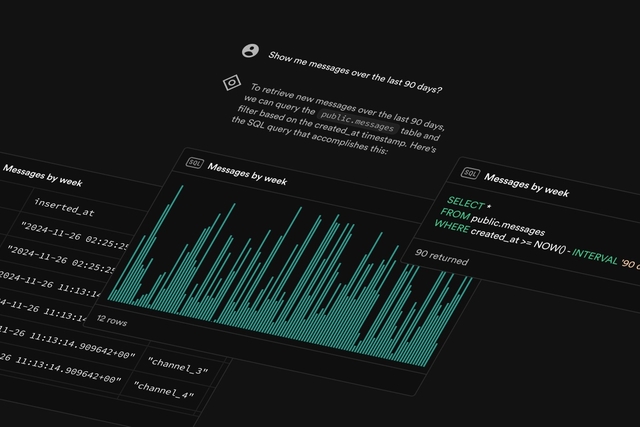
AI Assistant V2

We've always had the AI assistant sprinkled around the dashboard in the SQL Editor, and RLS Editor. Today we're making it accessible from anywhere in the dashboard, spiced with several new abilities to go along with 🎁 Read more about this in our blog post and learn how you can leverage the assistant to get more done, and quicker! 😄

Blog Post: https://supabase.com/blog/supabase-ai-assistant-v2

Link: https://supabase.com/project/_

PR: https://github.com/supabase/supabase/pull/30523
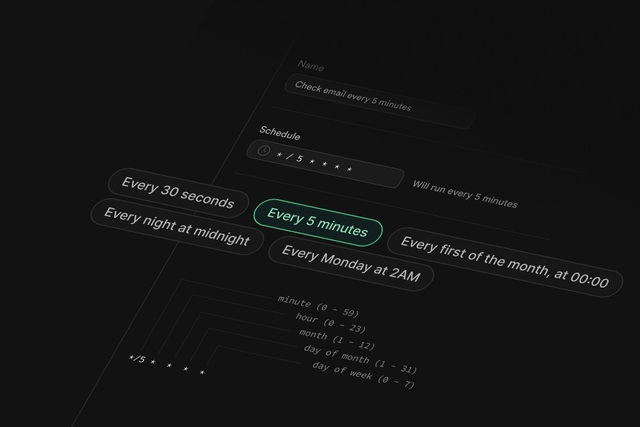
Cron

Create recurring jobs to run SQL snippets, or call database functions, Supabase Edge Functions, and even remote webhooks with our new Postgres Module, Cron! Supabase Cron is built on the powerful pg_cron extension by the team at Citus Data, and we appreciate the Citus Data for generously licensing their extension with the OSI-compatible PostgreSQL license, allowing us to support existing tools wherever possible. 💪🏻

Blog Post: https://supabase.com/blog/supabase-cron

Link: https://supabase.com/dashboard/project/_/integrations

PR: https://github.com/supabase/supabase/pull/29291
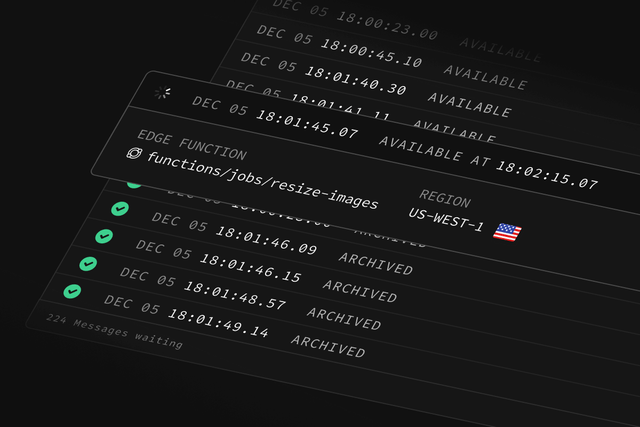
Queues

Process and manage asynchronous tasks with Supabase Queues! This is a Postgres-native, durable Message Queue with guaranteed delivery, improving the scalability and resiliency of your applications, and it's designed to work seamlessly with the entire Supabase platform. Similarly to Cron, Supabase Queues is built on the pgmq extension by the team at Tembo, and we appreciate the Tembo team for licensing their extension with OSI-compatible PostgreSQL license as well! 🙏

Blog Post: https://supabase.com/blog/supabase-queues

Link: https://supabase.com/dashboard/project/_/integrations

PR: https://github.com/supabase/supabase/pull/30300

Restore to a new project

You can now copy data easily from an existing Supabase project to an entirely new and independent one! This has been a well requested functionality and we're happy to share that it's finally possible to do so via the dashboard 🙂 Read more about this in our blog post, or in our documentation 🙏

Blog Post: https://supabase.com/blog/restore-to-a-new-project

Docs: https://supabase.com/docs/guides/platform/backups#restore-to-a-new-project

Link: https://supabase.com/dashboard/project/_/database/backups/restore-to-new-project

PR: https://github.com/supabase/supabase/pull/30325

Other bug fixes and improvements

Table Editor

  • Fix rendering of OID cell types causing a client crash (PR)

Dear Users,

Slack has deprecated their existing v1 API and will fully sunset the API over the next two years. This means that Slack Applications using the v1 Slack (Deprecated) provider will stop functioning if no action is taken. In turn, Supabase Auth users using the Slack (Deprecated) provider will also not be able to sign in via the Slack OAuth provider if no action is taken.

image

We’ve introduced a new replacement OAuth provider named “Slack (OIDC)” which supports the latest Slack API and will send out an email to affected users next week with instructions on how to migrate.

To migrate your authentication system, you'll need to:

  1. Create a new Slack Application in your Slack dashboard
  2. Update your credentials in the Supabase Dashboard by switching from the deprecated Slack (Deprecated) provider to the new Slack (OIDC) provider. You can find the provider in your project under Authentication > Providers > Slack (Deprecated)
  3. Update your code to use the new provider in all OAuth calls, like this:

_10
const { data, error } = await supabase.auth.signInWithOAuth({
_10
provider: 'slack_oidc',
_10
})

  1. If you are using the Supabase CLI , you will also need to update your config.toml to use [auth.external.slack_oidc] in place of [auth.external.slack_oidc]. See the local development docs for a detailed example.

Refer to our documentation for further details

Further configuration of the deprecated Slack provider will not be possible past 15th Jan 2025 as we will remove Slack provider from the dashboard then. If you need more time to access the configuration page , reach out to us via a support ticket.

Slack will terminate support for Legacy bots and Classic Apps on March 31, 2025 and March 31, 2026 respectively.

Please reach out via support or on the thread if there are any questions or concerns.

Build in a weekend, scale to millions