Supabase for Platforms
Use Supabase as a platform for your own business and tools.
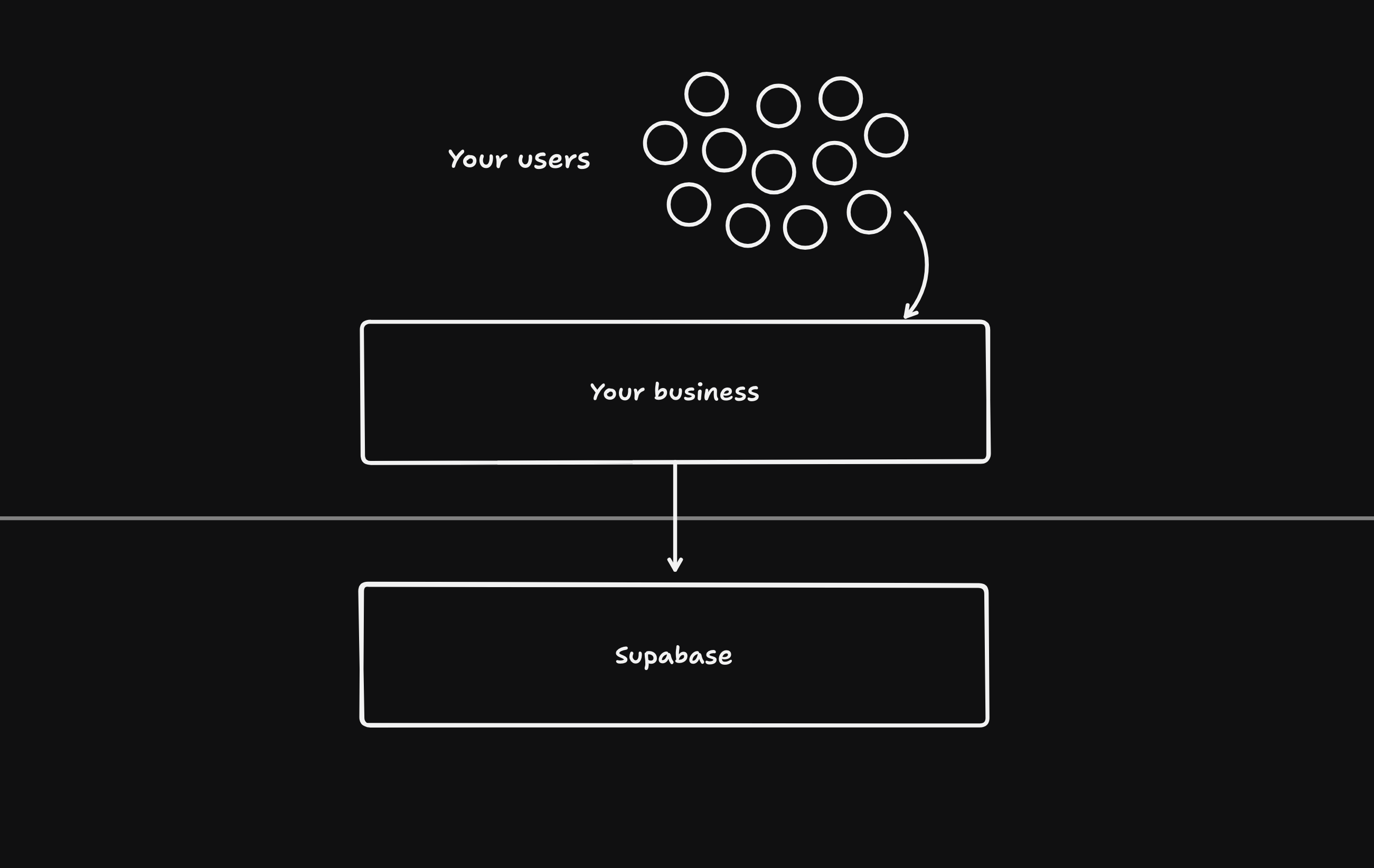
Supabase is a Platform as a Service (PaaS) that can be managed programmatically. You can use it to offer the key primitives to your own users, such as Database, Auth, Edge Functions, Storage, and Realtime. Supabase is commonly used as a platform by AI Builders and frameworks needing a backend.
This document will guide you on best practices when using Supabase for your own platform and assumes that Supabase projects are in a Supabase organization that you own. If you want to instead interact with projects that your users own, navigate to OAuth integration for more details.
Overview#
All features of Supabase can be managed through the Management API or the remote MCP Server.
Launching projects#
Management API endpoints:
- Create project:
POST /v1/projects - Get smart region selection codes:
GET /v1/projects/available-regions - Check service health:
GET /v1/projects/{ref}/health
We recommend:
- a very secure password for each database. Do not reuse the same password across databases.
- storing the encrypted version of the password. Once you set the password during project creation, there is no way to programmatically change the password but you can do so manually in the Supabase Dashboard.
- using smart region selection to ensure there's enough capacity. The available smart region codes are
americas,emea, andapacand you can make a request toGET /v1/projects/available-regionsfor region details. - using an appropriate instance size. Scale to zero pricing only applies to Nano instances, make sure to not pass in a
desired_instance_sizewhen creating a project. >= Micro instances are not able to scale to zero. - make sure that the services are
ACTIVE_HEALTHYafter project creation. After creating project, confirm the service that you want to make a request to has a status ofACTIVE_HEALTHYby pollingGET /v1/projects/{ref}/health. For example, before making a request to set an Auth configuration confirm that the Auth service has a status ofACTIVE_HEALTHY.
curl https://api.supabase.com/v1/projects \ --request POST \ --header "Content-Type: application/json" \ --header "Authorization: Bearer YOUR_SECRET_TOKEN" \ --data '{ "name": "Todo App", "organization_slug": "aaaabbbbccccddddeeee", "db_pass": "SUPER_SECURE_PASSWORD", "region_selection": { "type": "smartGroup", "code": "americas" }, "desired_instance_size": "micro" }'Nano compute instance#
Contact us for scale to zero pricing on Nano instances
Only select customers have access to scale to zero pricing on Nano instances. Submit this form to get access.
Recommended API keys#
Management API endpoints:
- Get the API keys:
GET /v1/projects/{ref}/api-keys - Enable the API keys:
POST /v1/projects/{ref}/api-keys
We are in the process of migrating away from our legacy API keys anon and service_role and towards API keys publishable and secret.
You can learn more by navigating to Upcoming changes to Supabase API Keys #29260.
Get the API keys by making a GET /v1/projects/{ref}/api-keys request.
curl 'https://api.supabase.com/v1/projects/{ref}/api-keys?reveal=true' \ --header 'Authorization: Bearer YOUR_SECRET_TOKEN'If the response includes "publishable" and "secret" keys then you're all set and you should only use those from now on.
Otherwise, enable the API keys by making two POST /v1/projects/{ref}/api-keys requests, one for publishable and another for secret.
curl 'https://api.supabase.com/v1/projects/{ref}/api-keys' \ --request POST \ --header 'Content-Type: application/json' \ --header 'Authorization: Bearer YOUR_SECRET_TOKEN' \ --data '{ "type": "publishable", "name": "default"}'curl 'https://api.supabase.com/v1/projects/{ref}/api-keys?reveal=true' \ --request POST \ --header 'Content-Type: application/json' \ --header 'Authorization: Bearer YOUR_SECRET_TOKEN' \ --data '{ "type": "secret", "name": "default", "secret_jwt_template": { "role": "service_role" }}'Changing compute sizes#
Management API endpoint: PATCH /v1/projects/{ref}/billing/addons
You can upgrade and downgrade compute sizes by making requests to PATCH /v1/projects/{ref}/billing/addons.
curl 'https://api.supabase.com/v1/projects/{ref}/billing/addons' \ --request PATCH \ --header 'Content-Type: application/json' \ --header 'Authorization: Bearer YOUR_SECRET_TOKEN' \ --data '{ "addon_type": "compute_instance", "addon_variant": "ci_small" }'Configuration changes#
Management API endpoints:
- Auth:
PATCH /v1/projects/{ref}/config/auth - Data API (PostgREST):
PATCH /v1/projects/{ref}/postgrest - Edge Functions:
- Storage:
PATCH /v1/projects/{ref}/config/storage - Realtime:
PATCH /v1/projects/{ref}/config/realtime
You can manage the configuration of all services using the Management API.
Development workflow#
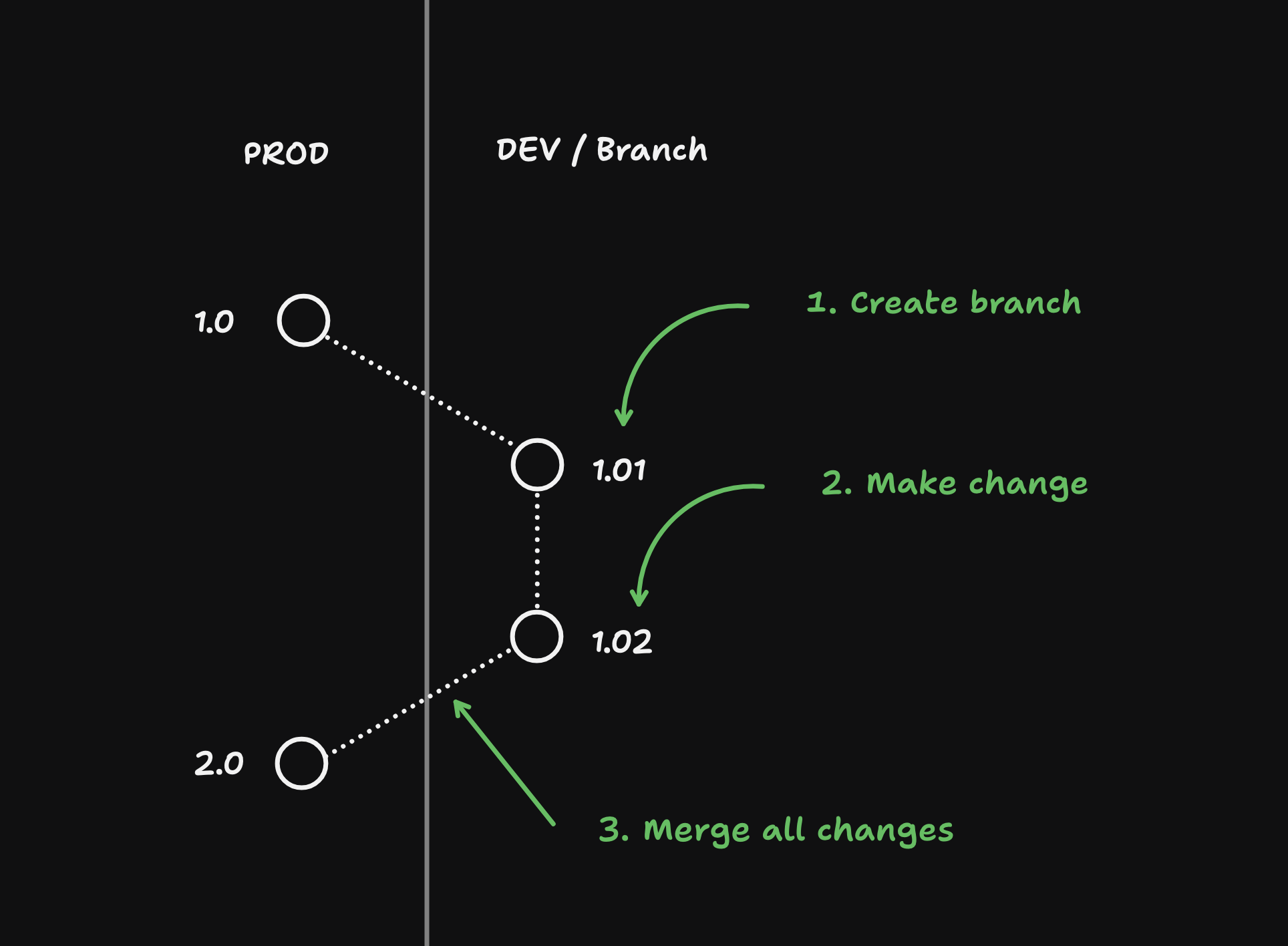
Supabase is a stateful service: we store data. If anything breaks in production, you can't "roll back" to a point in time because doing so might cause your users to lose any data that their production environment received since the last checkpoint.
Because of this, it's important that you adopt a development workflow on behalf of your users:
Creating a DEV branch#
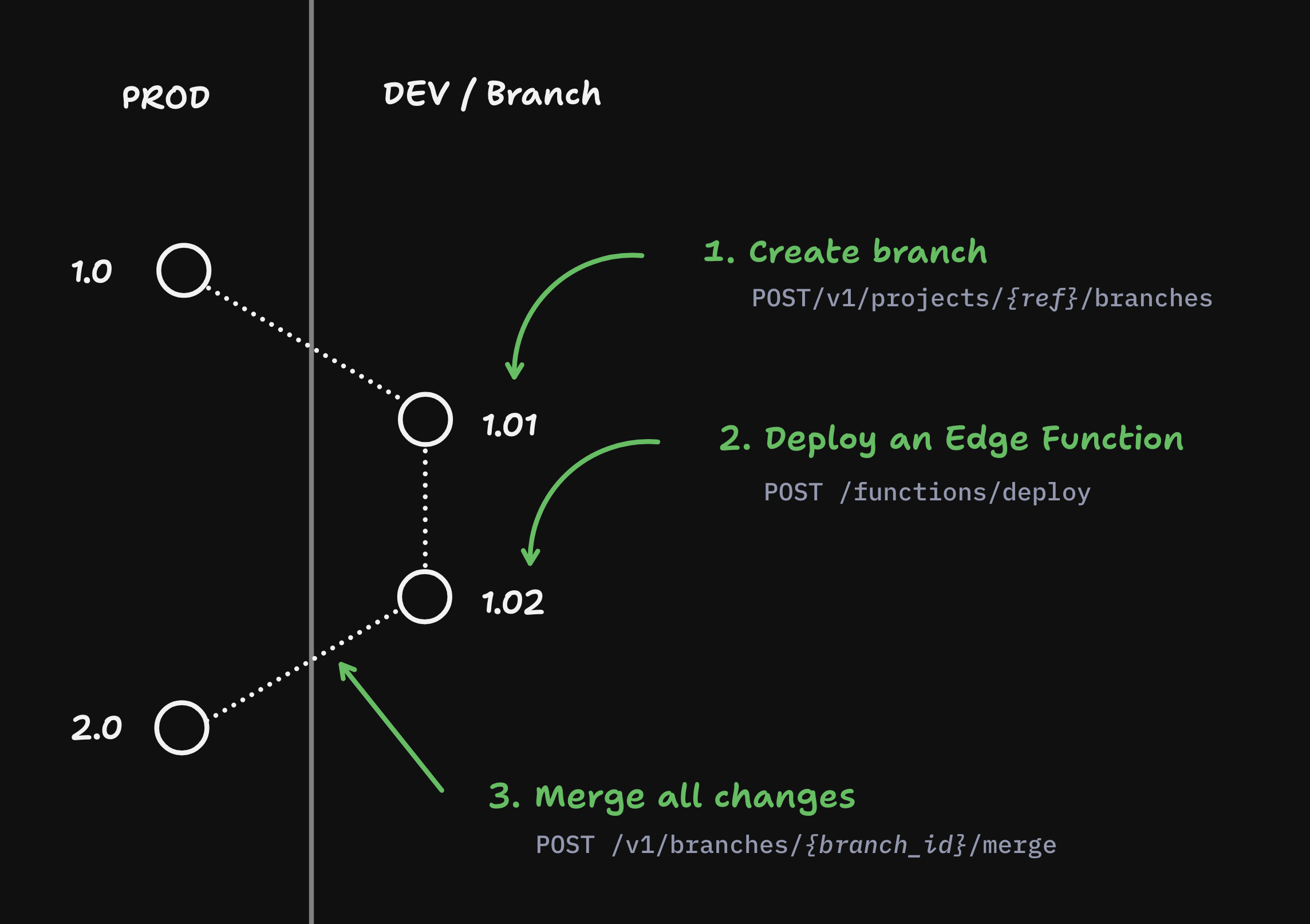
Management API endpoint: POST /v1/projects/{ref}/branches
After launching a project, it's important that all changes happen on a development branch. Branches can be treated like ephemeral servers: if anything goes wrong you can either revert the changes or destroy the branch and create a new one based off of production.
curl 'https://api.supabase.com/v1/projects/{ref}/branches' \ --request POST \ --header 'Content-Type: application/json' \ --header 'Authorization: Bearer YOUR_SECRET_TOKEN' \ --data '{ "branch_name": "DEV", "secrets": { "STRIPE_SECRET_KEY":"sk_test_123...", "STRIPE_PUBLISHABLE_KEY":"pk_test_123..." } }'Make database changes#
Management API endpoint: POST /v1/projects/{ref}/database/migrations
For this example we will create a todos table using the POST /v1/projects/{ref}/database/migrations endpoint.
create table public.todos ( id serial primary key, task text not null);alter table public.todosenable row level security;This endpoint will automatically create a migration inside the supabase_migrations schema and run the migration. If the schema migration fails, the changes will be rolled back.
curl https://api.supabase.com/v1/projects/{ref}/database/migrations \ --request POST \ --header 'Authorization: Bearer YOUR_SECRET_TOKEN' \ --header 'Content-Type: application/json' \ --data '{ "query": "create table public.todos (id serial primary key, task text not null); grant select on public.todos to anon; grant select, insert, update, delete on public.todos to authenticated; grant select, insert, update, delete on public.todos to service_role; alter table public.todos enable row level security;", "name": "Create a todos table" }'Create a restore point#
Contact us for access to restore points
Only select customers have access to restore points. Submit this form to get access.
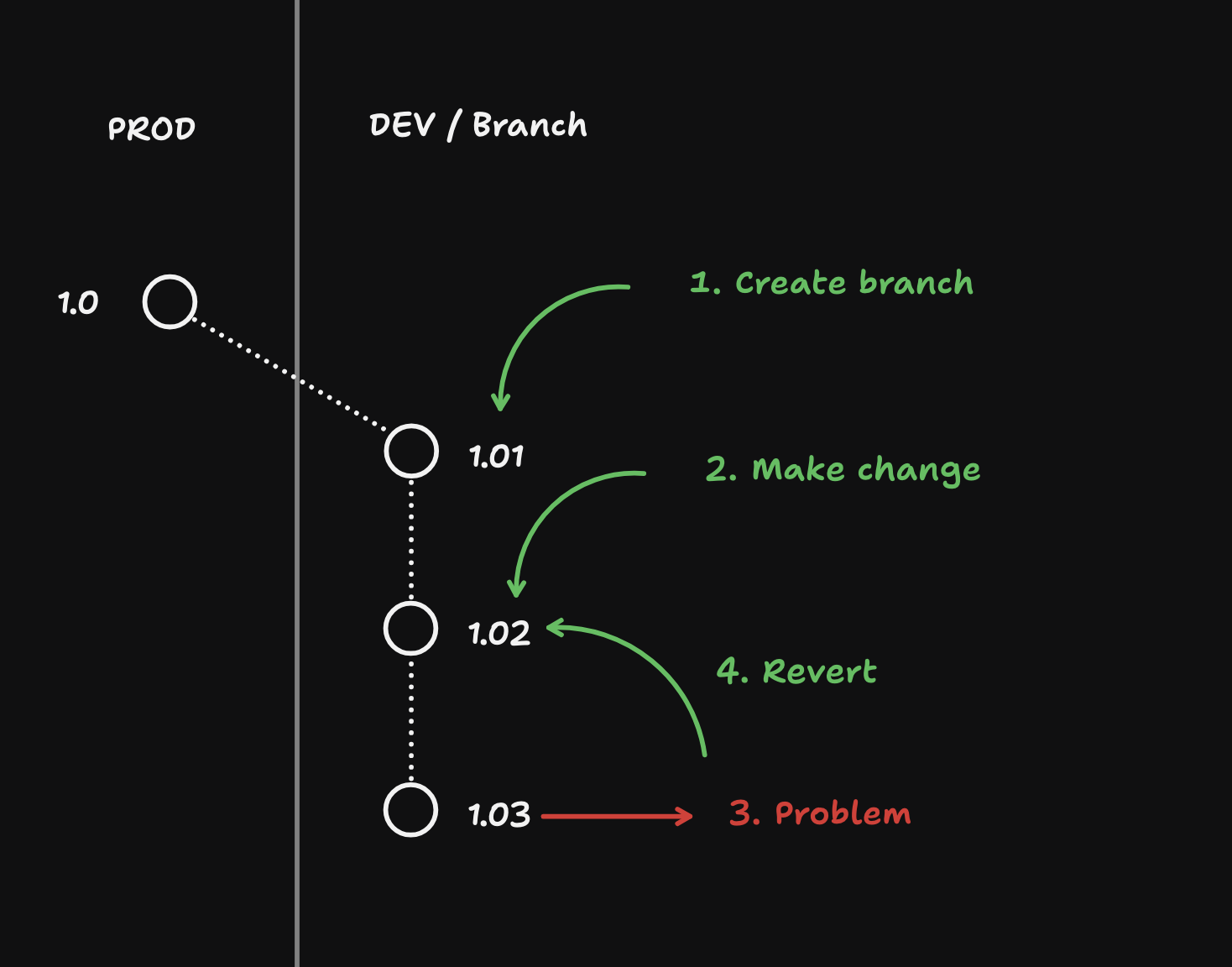
After every change you make to the database, it's a good idea to create a restore point. This will allow you to roll back the database if you decide to go in a different direction.
Beware that only database changes are captured when creating a restore point.
curl https://api.supabase.com/v1/projects/{ref}/database/backups/restore-point \ --request POST \ --header 'Authorization: Bearer YOUR_SECRET_TOKEN' \ --header 'Content-Type: application/json' \ --data '{ "name": "abcdefg" }'Reverting changes#
Contact us for access to restore points
Only select customers have access to restore points. Submit this form to get access.
After creating restore points, you are able to revert back to any restore point that you want.
curl https://api.supabase.com/v1/projects/{ref}/database/backups/undo \ --request POST \ --header 'Authorization: Bearer YOUR_SECRET_TOKEN' \ --header 'Content-Type: application/json' \ --data '{ "name": "abcdefg"}'When you revert changes, you are undo-ing all database changes since the specified restore point, including:
- Schema changes
- Any seed data that you inserted
- Any test users who have signed up (and auth tokens for sign ins)
- Pointers to files in Supabase Storage.
It will not affect:
- Configuration changes
- Any secrets that have been added
- Storage objects themselves
- Any deployed Edge Functions
Add seed data#
Do not use production data in branches!
It's important that the data in development branches is NOT production data, especially for non-developers who don't understand the implications of working with data. Security and side-effects (e.g. emailing all production users) are two reasons why this is important.
In DEV branches, seed data is common test data for users. Insert the following seed into the new todos table:
insert into todos (task)values ('Task 1'), ('Task 2'), ('Task 3');You can use the POST /database/query endpoint to add data:
curl https://api.supabase.com/v1/projects/{branch_ref}/database/query \ --request POST \ --header 'Authorization: Bearer YOUR_SECRET_TOKEN' \ --header 'Content-Type: application/json' \ --data-binary @- <<EOF{ "query": "insert into todos (task) values ('Task 1'), ('Task 2'), ('Task 3');"}EOFDeploying Edge Functions#
You can create and deploy Edge Functions on a branch and then merge them into Production.
curl https://api.supabase.com/v1/projects/functions/deploy \ --request POST \ --header 'Authorization: Bearer YOUR_SECRET_TOKEN' \ --header 'Content-Type: multipart/form-data' \ --form 'file=@path/to/function.zip' \ --form 'metadata={ "name": "my-function", "entrypoint_path": "index.ts", "import_map_path": "import_map.json", "static_patterns": ["assets/*", "public/*"], "verify_jwt": true }'Merge all changes#
Management API endpoint: POST /v1/branches/{branch_id_or_ref}/merge
Once the changes have been made, you can merge the changes into the production project:
curl https://api.supabase.com/v1/branches/{ref}/merge \ --request POST \ --header 'Authorization: Bearer YOUR_SECRET_TOKEN' \ --header 'Content-Type: application/json' \ --data '{}'Merging changes will automatically merge only the following:
- Database changes
- Deployed Edge Functions
Security checks for production#
Management API endpoint: GET /v1/projects/{ref}/advisors/security
Prior to deploying to production we strongly recommend running the security advisor on the project to make sure the latest changes are secure.
curl https://api.supabase.com/v1/projects/{ref}/advisors/security \ --request GET \ --header 'Authorization: Bearer {PAT_OR_USER_TOKEN}' \ --header 'Content-Type: application/json'Disaster recovery for production#
Management API endpoint: POST /v1/projects/{ref}/database/backups/restore-pitr
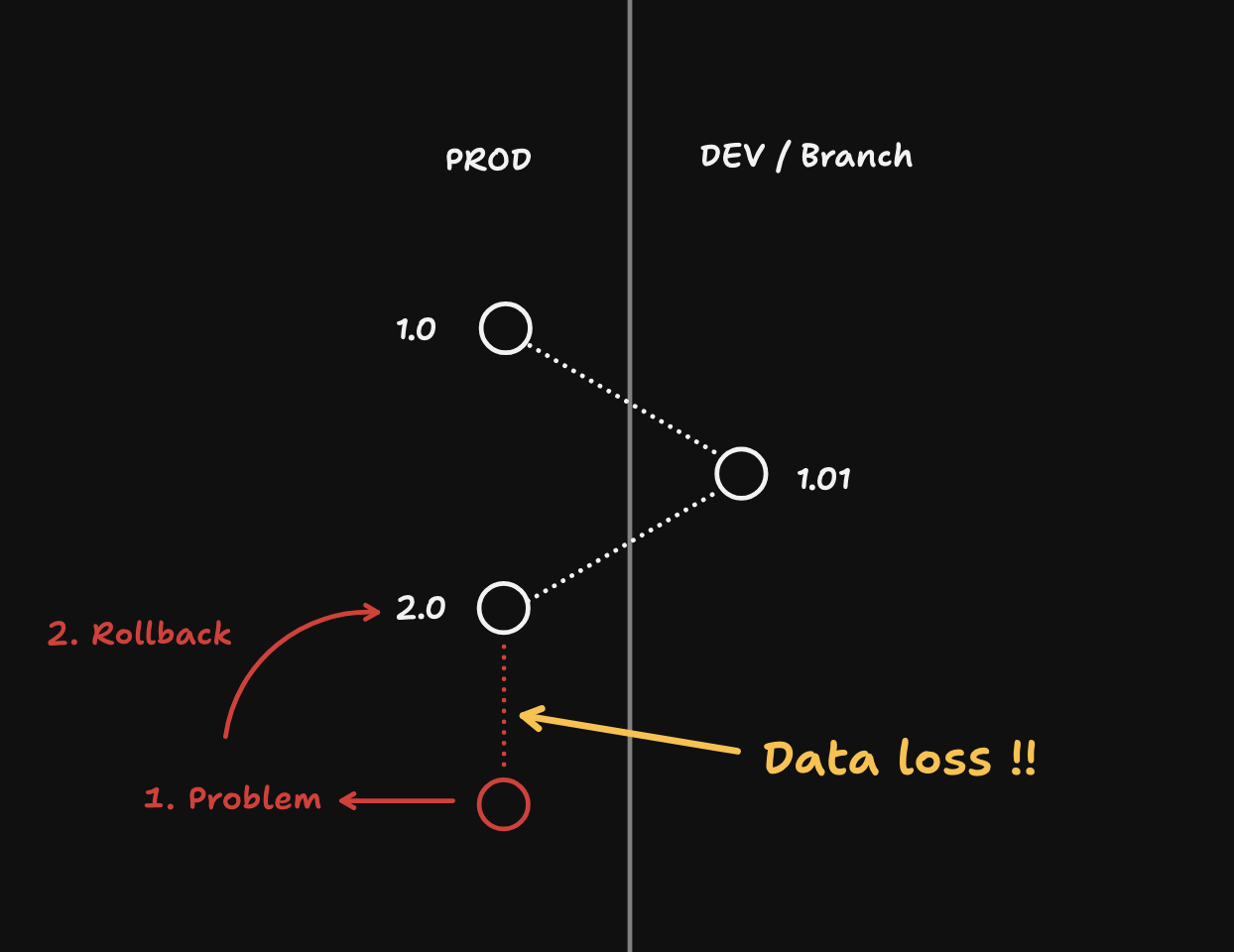
- Rollbacks can cause data loss. Only use it in
PRODwhen absolutely necessary. - Only available in prod when a project has already explicitly enabled PITR prior to rolling back.
curl https://api.supabase.com/v1/projects/database/backups/restore-pitr \ --request POST \ --header 'Authorization: Bearer {PAT_OR_USER_TOKEN}' \ --header 'Content-Type: application/json' \ --data '{ "recovery_time_target_unix": 1}'Claim flow#
Management API endpoint: GET /v1/oauth/authorize/project-claim
Your users may want to claim the project that currently lives in your org so that they can have more control over it.
We've enabled transferring the project from your org to your user's org while you continue to retain access to interact with the project through an OAuth integration.
curl -L "https://api.supabase.com/v1/oauth/authorize/project-claim?project_ref={ref}&client_id={oauth_client_id}&response_type=code&redirect_uri={redirect_uri}" \ --request GET \ --header 'Authorization: Bearer {PERSONAL_ACCESS_TOKEN}'The user is redirected to a Supabase UI:
- Create a new Supabase account or sign in to an existing one
- Create a new Supabase Organization or select an existing one
- Review your OAuth integration's permission scopes
- Review the Project transfer details
- Confirm the OAuth integration and the Project transfer for the selected Organization
Remove custom configuration before transferring project
Before transferring the project to your user's org, make sure to remove any custom configuration that you do not want your user's project to retain.
Platform kit#
Docs: https://supabase.com/library/docs/platform/platform-kit
We've created Platform Kit, a collection of UI components that interact with Management API, as a lightweight version of Supabase Dashboard that you can embed directly in your app so your users never have to leave in order to interact with the project.
Debugging projects#
Management API endpoint: GET /v1/projects/{ref}/analytics/endpoints/logs
When you need to debug a project, you can query the project's logs to see if there are any errors and address them accordingly.
Every log line from every service is a row in a single logs table, so filter by the source column to pick a service. Structured fields live in the log_attributes map, and the SQL is the ClickHouse dialect.
curl 'https://api.supabase.com/v1/projects/{ref}/analytics/endpoints/logs' \ --get \ --header 'Authorization: Bearer YOUR_SECRET_TOKEN' \ --data-urlencode "sql=select timestamp, log_attributes['response.status_code'] as status_code, log_attributes['request.path'] as path, event_message from logs where source = 'edge_logs' and toInt32OrZero(log_attributes['response.status_code']) >= 400 order by timestamp desc limit 100" \ --data-urlencode 'iso_timestamp_start=2025-03-23T00:00:00Z' \ --data-urlencode 'iso_timestamp_end=2025-03-23T01:00:00Z'