Changelog

New updates and product improvements

Improved mobile navigation for the dashboard#

https://github.com/user-attachments/assets/a2e1c815-6d65-486f-ae77-1d5993377c40

We've heard many feedback around mobile support for the dashboard and we're taking the first step towards supporting that πŸ“±πŸ™‚ While this PR doesn't completely optimize the mobile UX for the dashboard, navigating around the dashboard on mobile is now supported! We'll definitely be looking into optimizing other parts of the dashboard for mobile use so stay tuned! πŸ˜‰

PR: https://github.com/supabase/supabase/pull/31080

Link: https://supabase.com/dashboard

Inline completions via Assistant in SQL Editor#

image

In hopes to make the Assistant's UX more seamless while in the SQL editor, we've added support for adjusting your SQL snippets inline while in the SQL editor without having to open the Assistant panel. Highlight the section that you'd like to edit, and hit CMD / CTRL + K to pop open the inline prompt πŸ’¬ Less clicking, more typing!

PR: https://github.com/supabase/supabase/pull/30706

Link: https://supabase.com/dashboard/project/_/sql/new

Improve date time editing in Table Editor Grid#

We've also seen a couple of feedback around supporting copying and pasting raw date time values from the Table Editor. We've previously been using the browser native date time input field which we've realised have been less than optimal for the following reasons:

  • Adjusting the value typically takes several clicks which can feel frustrating
  • The precision of time values in JS does not match the precision of time values in Postgres
  • The UX varies a lot across browsers since each browser has their own implementation of the native date time input

As such we've decided to move towards supporting editing your raw values for date, timestamp, and timestamptz type fields, with a helper tooltip to show the time formatted in UTC and your relative timezone. This UX also allows us to support setting values to NULL which we struggled to do so gracefully with native browser date time inputs. Hope this helps make editing your data via the Table Editor easier πŸ™πŸ™‚ More screenshots available in the attached PR below!

PR: https://github.com/supabase/supabase/pull/31121

Link: https://supabase.com/dashboard/project/_/editor

Support for bulk delete users#

Also another feature that we've heard many requests for - you can now delete your users in bulk! Select the users that you'd like via the checkboxes and a button will appear to allow you to delete them all. There is, however, a temporary limitation that you may only delete up to 20 users at once, but we'll be looking into lifting this limitation eventually πŸ™‚

PR: https://github.com/supabase/supabase/pull/31271

Link: https://supabase.com/dashboard/project/_/auth/users

Other bug fixes and improvements#

General

  • Add ability for Assistant to retrieve database functions within a schema (PR)
  • Limit local storage memory to 20 chat messages for Assistant (PR)
  • Support scrolling up in chat while a new response is being streamed (PR)
  • Adjust warnings for destructive prompts via the Assistant (PR)
  • Assistant to adhere to Supabase Linter rules when generating responses (PR)

Table Editor

  • Add dropdown menu item to copy table name (PR)
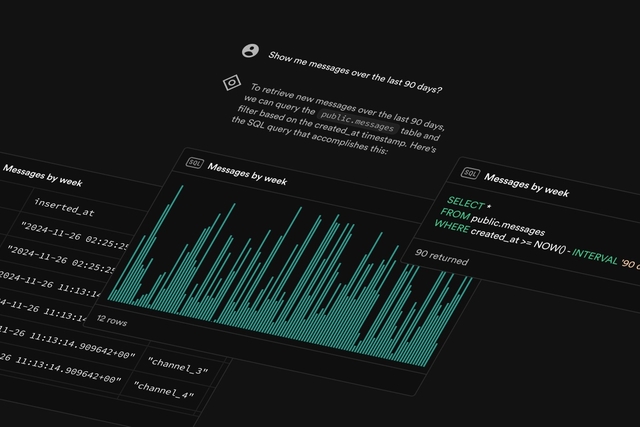
Launch Week 13 has wrapped up and it's now the holiday season! πŸŽ„πŸŽ If you might have missed our launches last week - fret not! We've got you covered with a brief summary of the changes that landed in the dashboard right here πŸ™‚

Dashboard Integrations#

You should have noticed by now, but we've added a new Integrations page where you can easily manage all things related to your database that may not necessarily be directly about your database. This allows us to consolidate some features that were in slightly odd places such as the GraphiQL IDE or Database Webhooks, and also provide UIs that are specific to certain database extension(s) such as Vault, or the newly added Queues and Crons (more on that below!). Database Wrappers have also been shifted here as well, and we hope that this shift will help make finding things around the dashboard easier for everyone πŸ™‚πŸ™

Link: https://supabase.com/dashboard/project/_/integrations

PR: https://github.com/supabase/supabase/pull/30476

AI Assistant V2#

We've always had the AI assistant sprinkled around the dashboard in the SQL Editor, and RLS Editor. Today we're making it accessible from anywhere in the dashboard, spiced with several new abilities to go along with 🎁 Read more about this in our blog post and learn how you can leverage the assistant to get more done, and quicker! πŸ˜„

Blog Post: https://supabase.com/blog/supabase-ai-assistant-v2

Link: https://supabase.com/project/_

PR: https://github.com/supabase/supabase/pull/30523

Cron#

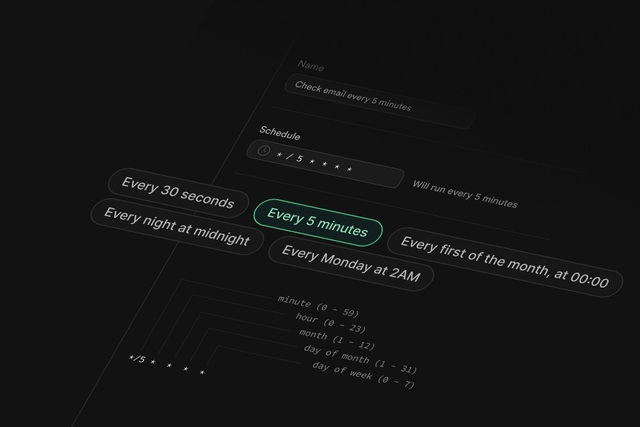
Create recurring jobs to run SQL snippets, or call database functions, Supabase Edge Functions, and even remote webhooks with our new Postgres Module, Cron! Supabase Cron is built on the powerful pg_cron extension by the team at Citus Data, and we appreciate the Citus Data for generously licensing their extension with the OSI-compatible PostgreSQL license, allowing us to support existing tools wherever possible. πŸ’ͺ🏻

Blog Post: https://supabase.com/blog/supabase-cron

Link: https://supabase.com/dashboard/project/_/integrations

PR: https://github.com/supabase/supabase/pull/29291

Queues#

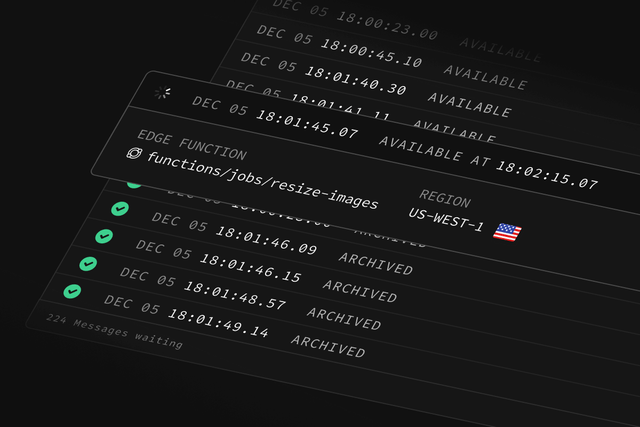
Process and manage asynchronous tasks with Supabase Queues! This is a Postgres-native, durable Message Queue with guaranteed delivery, improving the scalability and resiliency of your applications, and it's designed to work seamlessly with the entire Supabase platform. Similarly to Cron, Supabase Queues is built on the pgmq extension by the team at Tembo, and we appreciate the Tembo team for licensing their extension with OSI-compatible PostgreSQL license as well! πŸ™

Blog Post: https://supabase.com/blog/supabase-queues

Link: https://supabase.com/dashboard/project/_/integrations

PR: https://github.com/supabase/supabase/pull/30300

Restore to a new project#

You can now copy data easily from an existing Supabase project to an entirely new and independent one! This has been a well requested functionality and we're happy to share that it's finally possible to do so via the dashboard πŸ™‚ Read more about this in our blog post, or in our documentation πŸ™

Blog Post: https://supabase.com/blog/restore-to-a-new-project

Docs: https://supabase.com/docs/guides/platform/backups#restore-to-a-new-project

Link: https://supabase.com/dashboard/project/_/database/backups/restore-to-new-project

PR: https://github.com/supabase/supabase/pull/30325

Other bug fixes and improvements#

Table Editor

  • Fix rendering of OID cell types causing a client crash (PR)

Dear Users,

Slack has deprecated their existing v1 API and will fully sunset the API over the next two years. This means that Slack Applications using the v1 Slack (Deprecated) provider will stop functioning if no action is taken. In turn, Supabase Auth users using the Slack (Deprecated) provider will also not be able to sign in via the Slack OAuth provider if no action is taken.

image

We’ve introduced a new replacement OAuth provider named β€œSlack (OIDC)” which supports the latest Slack API and will send out an email to affected users next week with instructions on how to migrate.

To migrate your authentication system, you'll need to:

  1. Create a new Slack Application in your Slack dashboard
  2. Update your credentials in the Supabase Dashboard by switching from the deprecated Slack (Deprecated) provider to the new Slack (OIDC) provider. You can find the provider in your project under Authentication > Providers > Slack (Deprecated)
  3. Update your code to use the new provider in all OAuth calls, like this:

_10
const { data, error } = await supabase.auth.signInWithOAuth({
_10
provider: 'slack_oidc',
_10
})

  1. If you are using the Supabase CLI , you will also need to update your config.toml to use [auth.external.slack_oidc] in place of [auth.external.slack_oidc]. See the local development docs for a detailed example.

Refer to our documentation for further details

Further configuration of the deprecated Slack provider will not be possible past 15th Jan 2025 as we will remove Slack provider from the dashboard then. If you need more time to access the configuration page , reach out to us via a support ticket.

Slack will terminate support for Legacy bots and Classic Apps on March 31, 2025 and March 31, 2026 respectively.

Please reach out via support or on the thread if there are any questions or concerns.

Introduction#

We are removing app.settings.jwt_secret from the postgres database on 2024/11/22.

This setting has previously been available through our PostgREST integration, and could be accessed using current_setting('app.settings.jwt_secret') in SQL.

Why are we doing this?#

The jwt_secret can be used to mint new, custom JWTs and is security sensitive. Supabase limits access to the jwt_secret , through both the dashboard and API, to specific roles (owner, admin and developer). Allowing access to this setting directly in the database can allow bypassing of these restrictions.

What do you need to do?#

If you need the jwt_secret, it can be retrieved through the Supabase dashboard.

If you are using the app.settings.jwt_secret in SQL, you will need to update your function to retrieve this value from Vault.


_10
select vault.create_secret('JWT_SECRET', 'app.jwt_secret', 'The jwt secret');
_10
_10
-- retrieve the value, this replaces select current_setting('app.settings.jwt_secret')
_10
select decrypted_secret
_10
from vault.decrypted_secrets
_10
where name = 'app.jwt_secret';

Also, please consult the changelog entry for Asymmetric Keys to understand the coming changes to jwt_secret and how keys at Supabase are changing.

Table Editor Performance Improvements#

We've set aside some time to look into improving the performance of the Table Editor over the past few weeks, in particular shortening both perceived and actual loading times as you navigate around the Table Editor. This all comes together in several PRs as we explored from 2 angles:

  • Optimizing the queries that are firing behind the scenes by removing redundant sections + minimise waterfall requests
  • Introducing prefetching behaviours as your mouse cursor goes through the list of tables to have the tables' contents ready by the time you open it in the UI

Performance improvements have always been a consistent topic with the team, and we don't intend to stop here! Hopefully these changes will make it smoother and faster for you to build your project with the dashboard and as always let us know any feedback! πŸ™‚πŸ™ Just a button away in the top right corner of the dashboard to get your thoughts heard πŸ˜„

PRs:

Link: https://supabase.com/dashboard/project/_/editor

Other bug fixes and improvements#

Table Editor

  • Simplified header when rows are selected (PR)
  • Allow exporting of data on tables that are protected (PR)

Authentication

  • Fixed provider "Enabled" state when viewing user details if user's provider is LinkedIn (PR)
  • Sorting users on a column will shift users with NULL values on that column to the bottom (PR)
  • Fix "Last signed in at" column showing up as "Waiting for verification" on subsequent pages as page is scrolled down (PR)

Storage

  • Add ability to toggle image transformations from settings (PR)

πŸš€ Announcement: We’ve just released supabase-js version 2.46.2-rc.3, which resolves several type errors in the PostgREST client.

Notable issues resolved:#

We’d love your feedback to ensure everything runs smoothly!


Important Notes:#

This update might require regenerating your database types. You can do this via the Supabase CLI (β‰₯v1.207.8) or the dashboard. For instructions, check out our guide here.


Potential Issues#

This version introduces stricter alignment between runtime behavior and type inference. As a result, some types might appear "broken" but are actually being corrected.

The main changes to be aware of:

  1. The result of an embedding now correctly infers a single object or an array based on the relationship.
  2. The result of an object embedding now more accurately identifies whether the result can be null.

Before reporting a bug, please double-check that the inferred types are truly incorrect based on your query and database schema.


Bug Reporting:#

If your project is hosted on Supabase, please open a support ticket here and check "Allow Supabase Support to access your project temporarily." This will enable us to investigate your database types directly.

Alternatively, you can open an issue on GitHub. Please include:

  1. The generated Database type used to instantiate the client (e.g., createClient<Database>(process.env.SUPABASE_URL, process.env.SUPABASE_ANON_KEY)). If possible a minimal SQL declaration resulting in such Database type.
  2. The query where type inference failed (e.g., .from('which-table').select('which-query')).
  3. Your TypeScript version (npx tsc -v).

From Supabase CLI version 1.215.0 or higher you can configure a custom entrypoint to your Edge Functions. This can be used to write Edge Functions in pure JavaScript instead of TypeScript.

Save your Function as a JavaScript file (eg: index.js) and then update the supabase/config.toml as follows:


_10
[functions.hello-world]
_10
# other entries
_10
entrypoint = './functions/hello-world/index.js' # path must be relative to config.toml

You can use any .ts, .js, .tsx, .jsx or .mjs file as the entrypoint for a Function.

More details: https://supabase.com/docs/guides/functions/quickstart#not-using-typescript

Each Edge Function can now have its own deno.json or deno.jsonc file to manage dependencies. You will need to deploy your functions using Supabase CLI version v1.215.0 or above to make use of this feature.

How to use deno.json#

Create a deno.json in your function's folder:


_10
// supabase/functions/function-name/deno.json
_10
{
_10
"imports": {
_10
"lodash": "https://cdn.skypack.dev/lodash"
_10
}
_10
}

You can now use aliased imports in your source code:


_10
// supabase/functions/function-name/index.ts
_10
import lodash from 'lodash'

To test your function locally, run supabase functions serve. When you're ready, you can deploy it to hosted platform by running supabase functions deploy function-name

For more details, check the guide: https://supabase.com/docs/guides/functions/import-maps#using-denojson-recommended

Spam validation check now added to Auth templates#

We've now added a spam validation checker for your email templates in the Auth section of the dashboard! This is powered by SpamAssassin and is in hopes to assist you with writing email content in a way to avoid being marked as spam by email clients.

You will still be able to save your email templates regardless of whether you're using the built-in SMTP provider or a custom SMTP provider. However, we highly recommend fixing these warnings since they can affect email deliverability.

PR: https://github.com/supabase/supabase/pull/30188

Links: https://supabase.com/dashboard/project/_/auth/templates

Other improvements and bug fixes#

Authentication

  • Hovering over auth logs for a user will show relative time info (PR)
  • Allow sorting on last signed in at for users (PR)
  • Allow selection of functions that return void for auth hooks (PR)
  • Allow updating of SMS rate limit irregardless of SMS autoconfirm being enabled (PR)

Storage

  • Fix developer roles not being able to update buckets (PR)

Database

  • Fix create index "Select a table" combobox not using search input (PR)
  • Support opening tables in table editor from the schema visualizer (PR)

Logs & Analytics

  • Fix filters for log reports (PR)

Edge Functions now support importing NPM packages from private registries. You will need to deploy your functions using Supabase CLI version v1.207.9 or above to make use of this feature.

How to use packages from private registries#

Create a .npmrc file within supabase/functions. This will allow you to import the private packages into multiple functions. Alternatively, you can place the .npmrc file directly inside supabase/functions/function-name directory.

Add your registry details in the .npmrc file. Follow this guide to learn more about the syntax of npmrc files.


_10
@myorg:registry=https://npm.registryhost.com
_10
//npm.registryhost.com/:_authToken=VALID_AUTH_TOKEN

After that, you can import the package directly in your function code or add it to the import_map.json (https://supabase.com/docs/guides/functions/import-maps#using-import-maps).


_10
import MyPackage from "npm:@myorg/private-package@v1.0.1"
_10
_10
// use MyPackage

To test your function locally, run supabase functions serve. When you're ready, you can deploy it to hosted platform by running supabase functions deploy function-name

We've been building for 9 months now, are we're getting even closer to Beta.

This is also available as a blog post and a video demo.

Add users#

You can now add users manually from your dashboard.

User admin#

You can also perform admin functions on existing users - send password reset emails, magic links, and delete users.

Even more powerful SQL Editor#

Last month we announced an improved SQL Editor, and this month we've taken it even further. The SQL Editor is now a full Monaco editor, like you'd find in VS Code. Build your database directly from the browser.

Status page#

We added a Status Page which tracks the uptime and latency of the Supabase platform.

Kaizen#

  • We completed a security audit by DigitalXRAID.
  • Email confirmations now enabled by default for signups.
  • Updated Benchmarking Suite to include more realistic workloads, on various different servers (results published soon).
  • You can now set/edit/remove Foreign Keys via the table editor.

We're now 8 months into building Supabase. We're focused on performance, stability, and reliability but that hasn't prevented us from shipping some great features.

This is also available as a blog post and a video demo.

Supabase.js 1.0#

In the lead-up to our Beta launch, we've released supabase-js version 1.0 and it comes with some major Developer Experience improvements. We received a lot of feedback from the community and we've incorporated it into our client libraries for our 1.0 release.

Check out the blog post to learn more.

More powerful SQL Editor#

Although it was only intended to be a temporary feature, the SQL Editor has become one of the most useful features of Supabase. This month we decided to make give it some attention, adding Tabs and making it full-screen. This is the first of many updates, we've got some exciting things planned for the SQL Editor.

Keyboard shortcuts for Power Users#

For the heavy table editor users, we've gone ahead and added a bunch of key commands and keyboard shortcuts so you can zip around and manipulate your tables faster than ever.

One of the most requested Auth features was the ability to send magic links that your users can use to log in. You can use this with new or existing users, and alongside passwords or stand alone.

Kaizen#

  • We have new and improved docs.
  • We converted realtime-js to TypeScript.
  • Dashboard Performance: we heavily optimised our dashboard routes.
  • With the help of the community, we closed a lot of issues during Hacktoberfest.
  • We have started benchmarking all the open source tools we use. We'll publish the results this month.

This is also available as a blog post.

Third-party logins#

We've released OAuth logins! You can now enable third-party logins on your app for Bitbucket, GitHub, GitLab, or Google.

Clone tables#

You can duplicate your tables, just like you would inside a spreadsheet.

Enable and disable extensions#

Extensions are easier to use. You can enable Postgres extensions with the click of a button.

Save your favorite queries#

The SQL editor now stores your query history in your browser. You can also save your favorite queries to run later!

GitHub Discussions#

Supabase was given access to GitHub Discussions! This is the place for you to ask questions or show off what you've built with Supabase.

Kaizen#

This is also available as a blog post.

We're 6 months into building our hosted database platform and we've made some major improvements to our auth system and table view.

Easily create tables#

Set up tables and columns directly from the table view.

Invite your team#

You can now invite team members to your organisation.

Auth: Email Confirmations#

You can now enable Email Confirmations for new users. This can be toggled on or off and the template for this email can be edited via the dashboard.

Typescript support#

The biggest communty contribution to date, @thorwebdev added Typescript support to Supabase. He even live streamed the process.

Kaizen#

We have a number of small improvements:

Alpha July 2020

Aug 5, 2020

Supabase July Alpha Updates#

This is also available as a full blog post with videos.

After 5 months of building, we're releasing one of our most anticipated features: Supabase Auth.

Auth#

This month, we're ecstatic to announce a feature we think you'll love: Supabase Auth. It's too big to fit into a monthly update so look out for a full update in the next few days.

We want to make it easy to get started adding Auth to your app, so we've released a simple example and a video tutorial which shows you how to implement a basic auth system using PostgreSQL's Row Level Security.

Table Editor#

We've made some massive improvements to our Table Editor that we're excited to share.

Relationship drill down#

Last month we made it easy to drill into your table relationships. This month, we make it possible to drill multiple levels deep.

Add, delete, and download rows#

We're making it easier to manipulate your data. Next month, you'll be able to add and remove columns directly from the Table view.

New Postgres Extensions#

If you launch a new Supabase project, you'll have access to several new Postgres extensions:

  • pgsql-http: HTTP client for PostgreSQL, retrieve a web page from inside the database.
  • pgjwt: PostgreSQL implementation of JSON Web Tokens
  • plpgsql_check: a linter tool for language PL/pgSQL
  • pljava: write Java in your stored procedures, triggers, and functions

Kaizen#

We have a number of small improvements:

  • Added Auth documentation to the auto-generated docs in each project
  • Added a new or filter to the client library
  • Table View now remembers which tabs you had open.
  • We have released a lot of new functionality to pg-api, a server for for managing Postgres internals via a REST interface.
  • Performance: the "flash of black" which was appearing on page transition is now gone

Alpha June 2020

Jul 2, 2020

Supabase June Alpha Updates#

This is also available as a full blog post with videos.

We're now 4 months into building Supabase, which means another major update. Here's a few things we think you'll love in this release.

View relational data#

We're sometimes asked how we will make Postgres as simple as Firebase, since Postgres is a relational database. This month we're making our first steps to prove that relational databases can be even easier to use than document stores. We're releasing an excel-like editing interface which can drill down into your relational data.

image

Manage JSON data#

Postgres is an amazing database, giving the flexibility of a document store with the power of a RDBMS. If you use JSON data in Postgres, then we want to make that easy too. Supabase detects when your column is JSON or JSONB, and provides an easy way to edit and view your data. More improvements coming soon for this feature!

image

Choose your region#

If you noticed a bit of latency on Supabase, it's because your projects were previously set up in Singapore. It was always our intention that you'd be able to choose your database region, and this month we've delivered it. In the next releases we'll even allow you to go multi-region, instantly replicating your database close to your customers.

image

Backups#

A guiding principle at Supabase is zero lock-in. So this month we are exposing your daily database backups on the dashboard, giving you a simple way to migrate off Supabase. We have a lot more to build in this space (WAL-G!), so watch this space.

image

Build in a weekend, scale to millions